01What it does
What do TikStage Actions do on a TikTok LIVE?
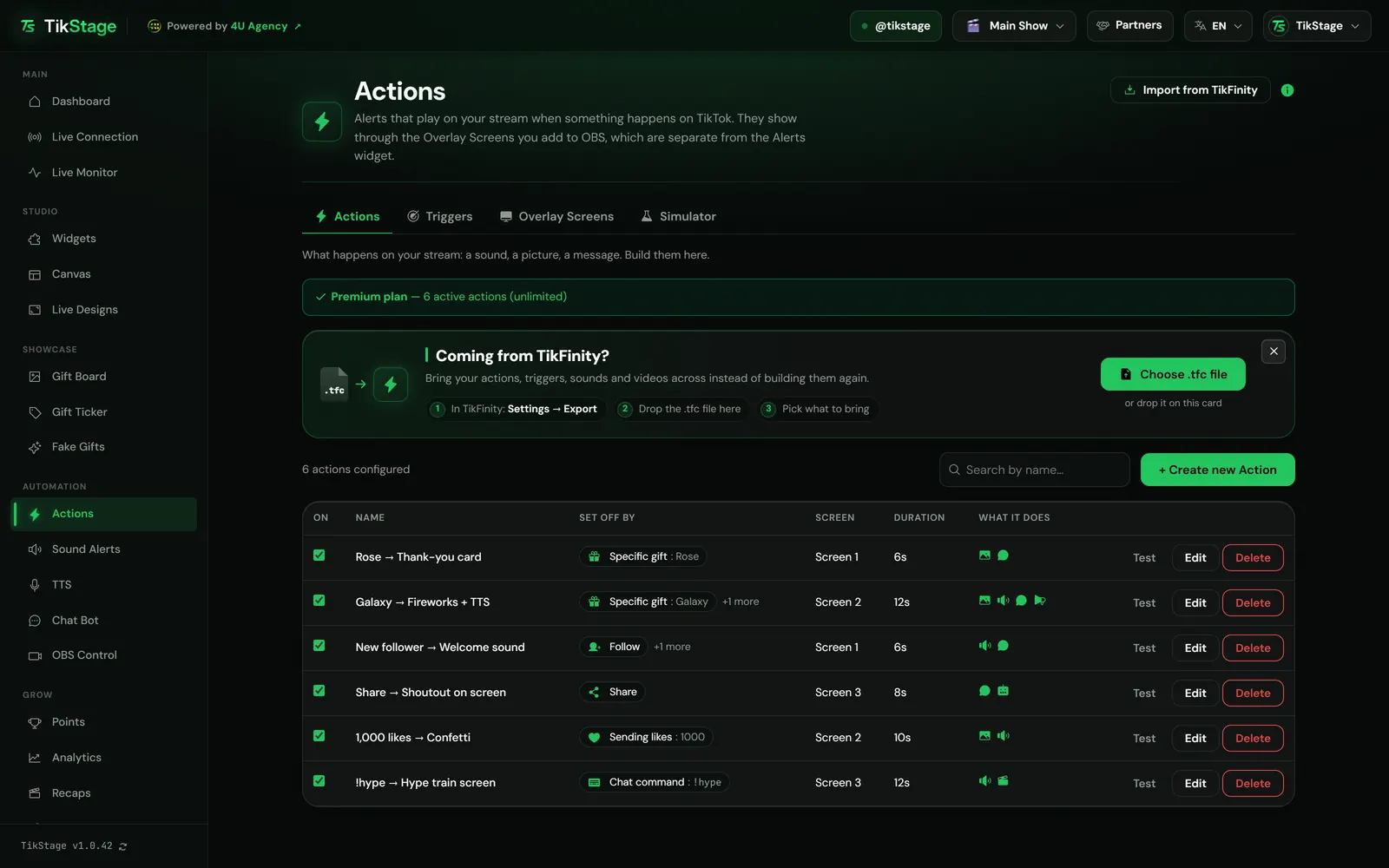
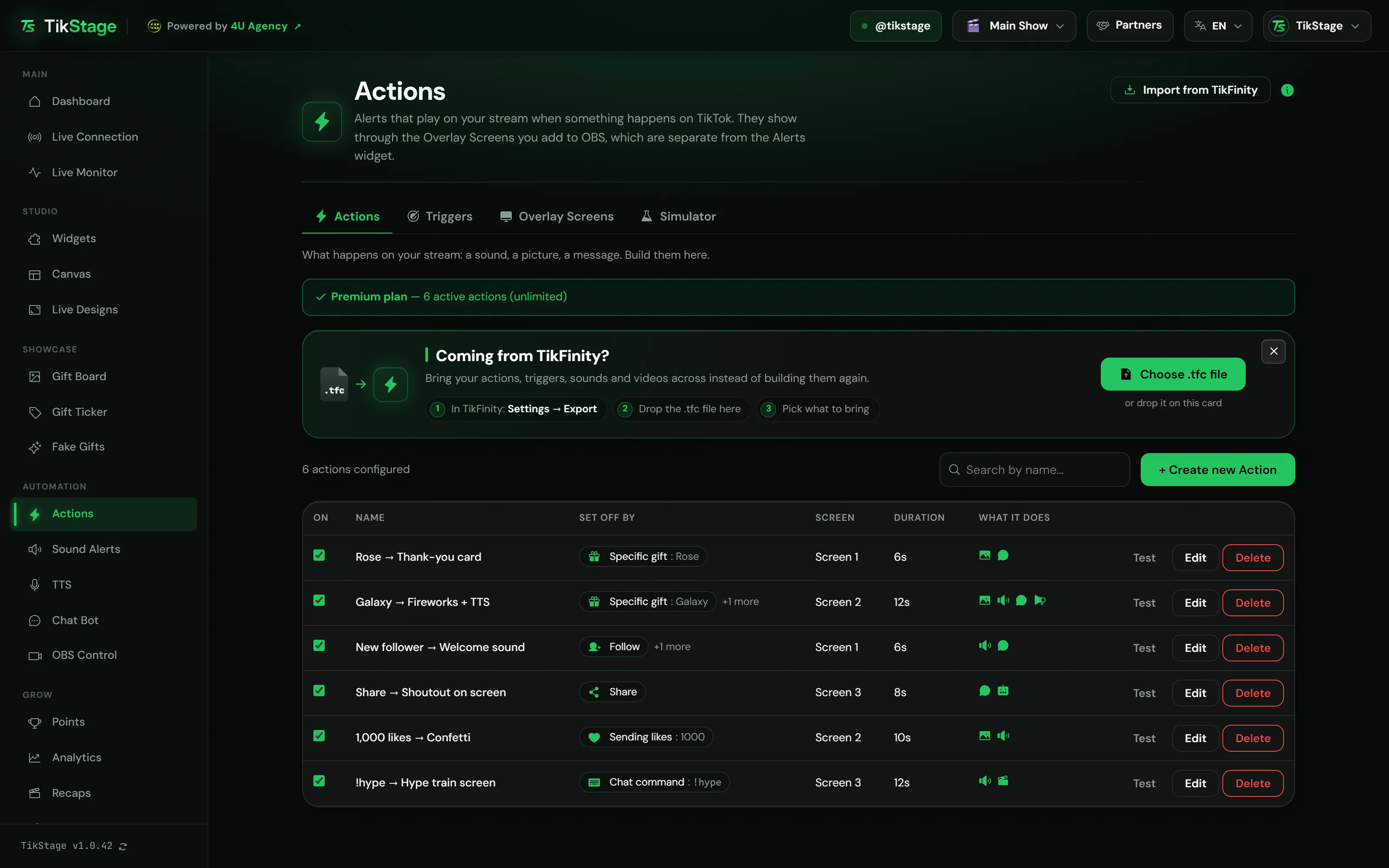
TikStage Actions are the alerts that play on your TikTok LIVE when something happens on TikTok. A trigger such as a gift, a follow or a chat command sets each one off.
At a glance
| Plan | Free: up to 5 actions switched on at once. Premium: no limit, plus key presses in your game. |
|---|---|
| Where you set it up | The TikStage desktop app for Windows (64-bit). The dashboard does not open in a web browser. |
| Where alerts show | 8 overlay screens, each a link you add to OBS as a Browser Source. |
02How to set it up
How do I set up TikTok LIVE gift alerts in OBS?
Install the TikStage desktop app for Windows, add an overlay screen link to OBS as a Browser Source, create an action, choose the trigger that sets it off, and test it.
Get the desktop app
The Actions page lives in the TikStage desktop app for Windows, not in a web browser.
Download TikStage for WindowsAdd a screen to OBS
On Overlay Screens, press Copy URL and paste the link into OBS as a Browser Source with a transparent background.
Create an action
On the Actions tab press Create new Action, name it and switch on what it should do, then pick its Overlay screen.
Choose what sets it off
After saving, the app asks Saved. What should set it off? Pick an event such as a Specific gift, now or later on the Triggers tab.
Test it and go live
Press Test on the action, or send a fake gift from the Simulator. Then connect TikStage to your TikTok LIVE, and each trigger plays its actions on their screens.
03What an action can do
What can a TikStage alert show, play or say?
A TikStage action can show an image or GIF, play audio, play a video, show the viewer's name with your own message, read a message out loud and, on Premium, press a key on your PC. You can switch on several in one action, and they all play when it fires.
| Switch in the editor | What it does |
|---|---|
| Show Image / GIF | Shows a PNG, JPG, GIF or WebP picture, or a vector animation from the library. |
| Play Audio | Plays an MP3, WAV or OGG file. With a video on too, the video plays muted. |
| Play Video | Plays a clip with its own sound. A video takes priority over an image. |
| Show Alert (User + Text) | Shows the viewer's name and your message, in a text colour you pick for this action. |
| Read the message out loud | Speaks your message with the voice set on the TTS page. OBS can capture it as desktop audio. |
| Enable keystroke simulation | Presses one key in the window in front. Premium. |
{nickname}and{username}- The viewer's display name, and their TikTok handle.
{giftname}- The name of the gift.
{repeatcount}- How many gifts in the combo (on a per-gift alert, the running count).
{comment}- The viewer's chat message.
Thank you {nickname} for the {giftname}!
tikstageThank you TikStage Fan for the Galaxy!
04Triggers
What can set off an alert: gifts, follows, likes or commands?
Eleven TikTok events can set off a TikStage action: a gift over a coin value, a specific gift, a follow, a subscribe, a share, likes, a chat message, a chat command, an emote, a viewer joining and a viewer's first activity in the LIVE. A trigger can also be limited to followers, subscribers, moderators, top gifters or one viewer.
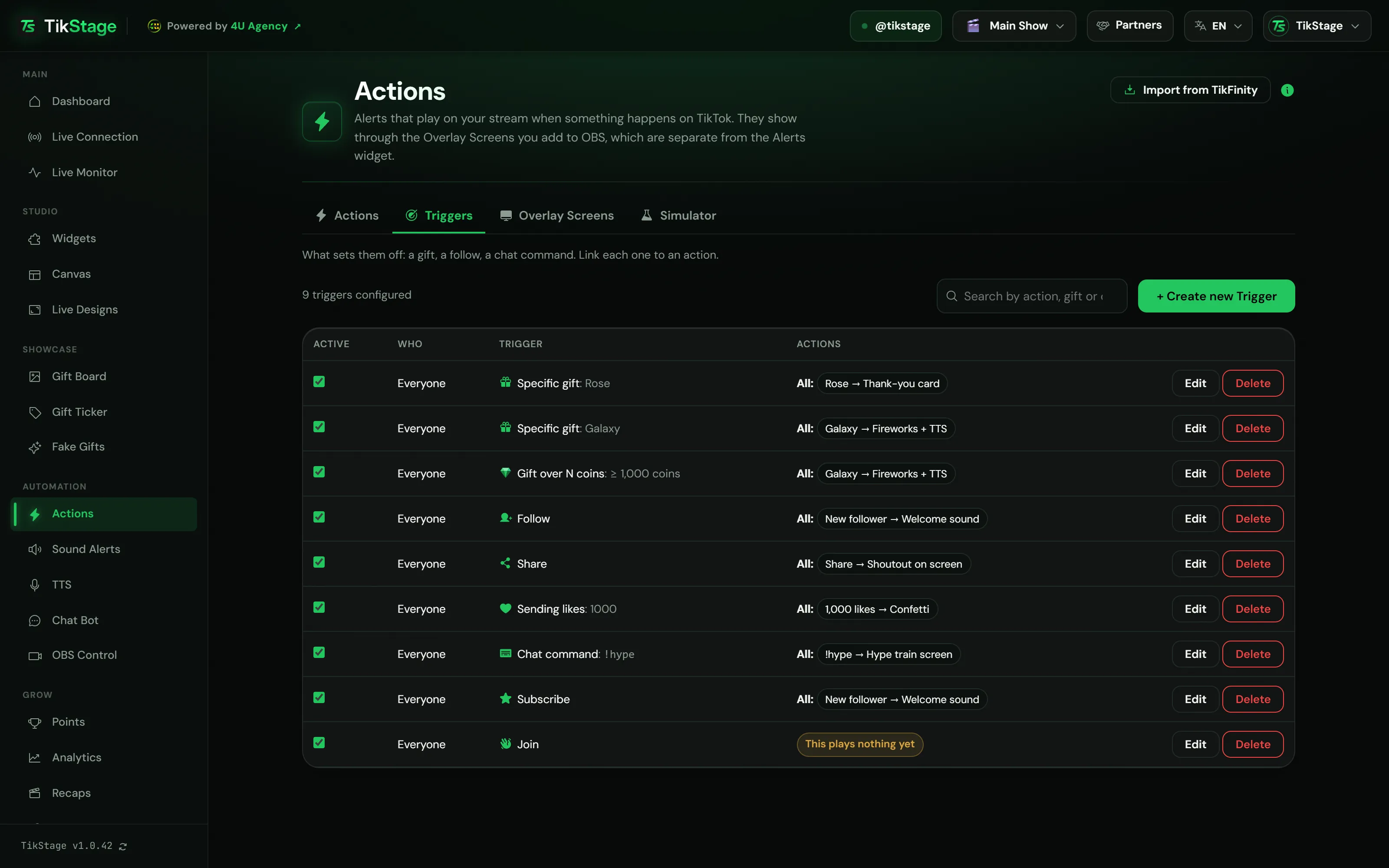
- Gift combos: a Specific gift trigger plays once for every gift as the taps land. A Gift over N coins trigger waits for the combo to end and plays once, on the total.
- Likes: a Sending likes trigger counts likes per viewer and plays again at every multiple (500, 1000, 1500…).
- Several actions: a trigger plays every action under Trigger ALL of these actions, plus one picked at random from Trigger ONE random of these actions.
- OBS: switch on Also control OBS on a trigger to switch a scene, show or hide a source, or start and stop recording, once OBS is connected on the OBS Control page.
05Testing
How do I test TikTok LIVE alerts without going live?
With the TikStage Simulator tab and the Test button. The Simulator sends fake follows, shares, subscribes, likes, chat messages and gifts, and your triggers and actions react as they do to real events.
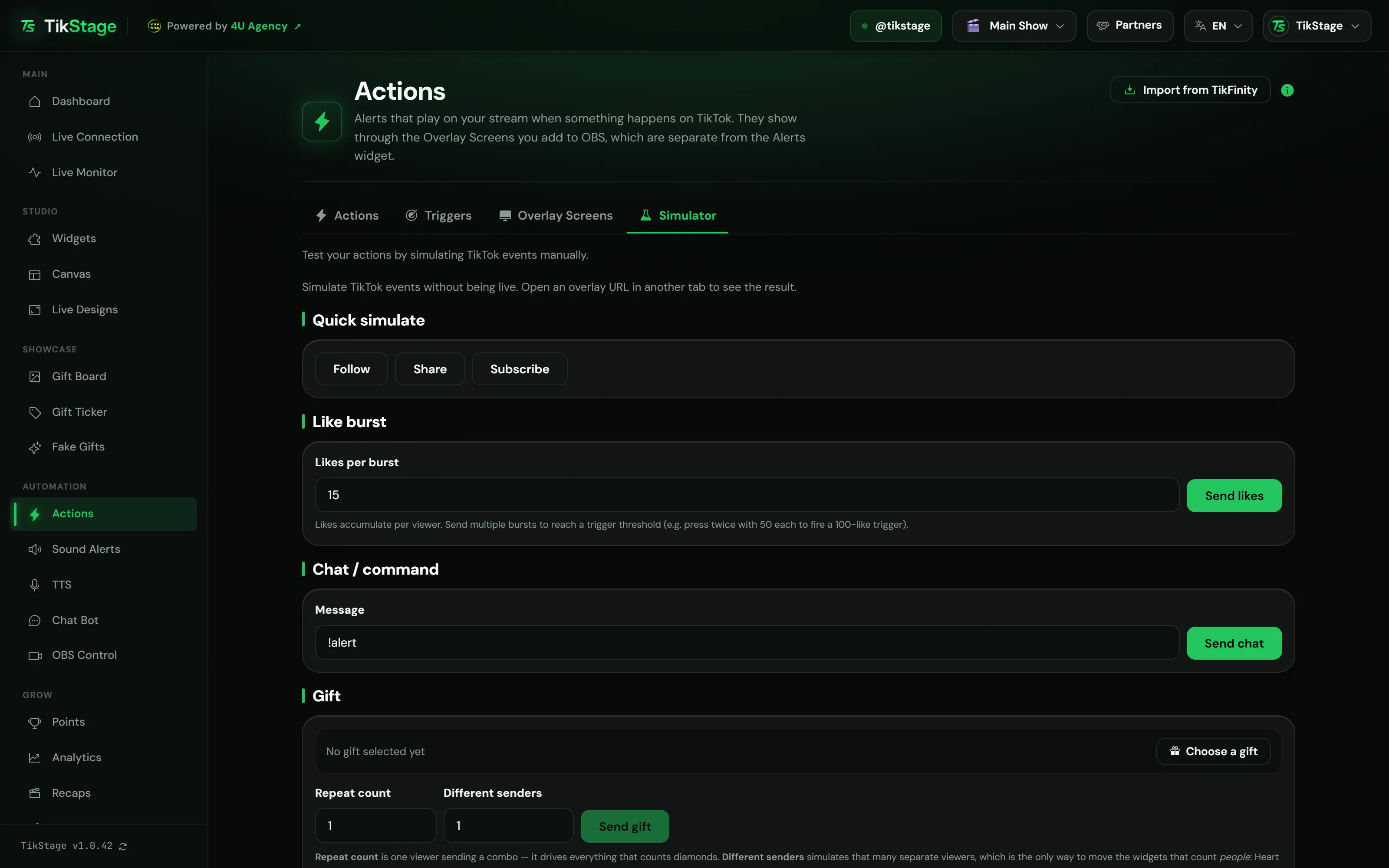
- Like burst: likes add up per viewer, so send several bursts to reach a threshold.
- Simulated events also move your widgets, but they add no points.
The Test button plays one action on its screen without a trigger. If OBS is not showing that screen, it tells you and names the link to add.
06Limits
What are the limits?
Up to 5 active actions on the Free plan, 8 overlay screens that each play one alert at a time, one trigger per event and kind, and set-up only in the Windows desktop app.
- Free plan: up to 5 actions switched on at once on your stream profile. Key presses are Premium.
- The dashboard runs in the TikStage desktop app for Windows (64-bit): not in a web browser, and there is no Mac build.
- Spoken messages and key presses need the desktop app running on your PC.
- Image 5 MB, audio 10 MB, video 50 MB. No pasted links, and no library for videos.
- Actions play only on the Overlay Screens links, not in the Alerts widget on the Widgets page.
07Is it free?
Are TikStage alerts and actions free?
Yes. The Free plan includes Actions with up to 5 switched on at once, every trigger, the 8 overlay screens, the Simulator, the TikFinity import, Sound Alerts and OBS control. Premium removes the limit on active actions and adds key presses in your game.
Free plan
Up to 5 active actions
Up to 5 actions can be on at once on your stream profile, and more can stay switched off. No key presses.
Premium
No limit, plus keystrokes
No limit on active actions, key presses in your game, and up to 10 stream profiles, each with its own actions, triggers and sound alerts.
08FAQ
More questions creators ask
Can I use them in TikTok LIVE Studio?
An overlay screen is a web link, like TikStage's widget links, so you add it the same way: as a browser source in OBS or in TikTok LIVE Studio. OBS control, though, works with OBS Studio only.
Can I import my TikFinity alerts?
Yes, from a TikFinity .tfc settings file: actions, triggers, sounds, pictures and videos. Chat replies, webhooks and a few other things stay behind, and the import names each one.
Can a gift press a key in my game?
Yes, on Premium, in the TikStage desktop app for Windows. An action presses one key, with Ctrl, Shift or Alt if you want, in the window in front.
Why did only one alert play when two triggers matched?
One event plays one trigger of each kind, the most specific one: a specific viewer beats everyone, a specific gift beats a coin threshold, a command beats any chat message. On a tie, the one higher in your list plays.
Can an alert read the viewer's message out loud?
Yes, on a chat message or chat command trigger. Switch on Read the message out loud and use the {comment} placeholder.