
01What it does
What does TikStage Analytics show about my TikTok LIVE?
TikStage Analytics shows how your TikTok LIVEs went, what you earned, who follows and gifts, and the hours that bring the most diamonds. It puts TikTok's own figures, synced by the desktop app, next to the gifts TikStage recorded while connected to your LIVE.
At a glance
| Plan | Premium. On the Free plan the page shows a Premium feature card instead. |
|---|---|
| Where it runs | The TikStage desktop app for Windows. It does not open in a web browser. |
| Tabs | LIVE, Earnings, Audience and Trends. |
| Where the numbers come from | TikTok's own figures, synced by the app from the TikTok account you sign in with, and the gifts TikStage recorded while connected to your LIVE. |
| Periods | LIVE Performance, Creator Earnings and Followers & reach show the last 7, 28 or 60 days (7 at first). One switch moves all three. |
| Sync | A line above the tabs shows when TikTok's figures last synced. |
02How to set it up
How do I set up TikTok LIVE analytics in TikStage?
Install the TikStage desktop app for Windows, be on Premium, and sign in to TikTok inside the app. TikTok's figures then sync on their own, and TikStage records your gifts whenever it is connected to your LIVE.
Get the desktop app
Analytics is a page of the TikStage desktop app for Windows.
Download TikStage for WindowsBe on Premium
On the Free plan the page shows a Premium feature card with a way to upgrade.
Sign in to TikTok in the app
Log in with your TikTok account on the Live Connection page. The strip above the tabs then shows when your TikTok figures last synced.
Go live with TikStage connected
TikTok's figures sync when the app starts and whenever a LIVE starts or ends, and an open page refreshes itself. TikStage counts gifts only while it is connected to your LIVE.
Pick a tab and a period
Open LIVE, Earnings, Audience or Trends. The 7d, 28d and 60d switch moves every card that has it.
03LIVE stats
How do I see the stats of each TikTok LIVE?
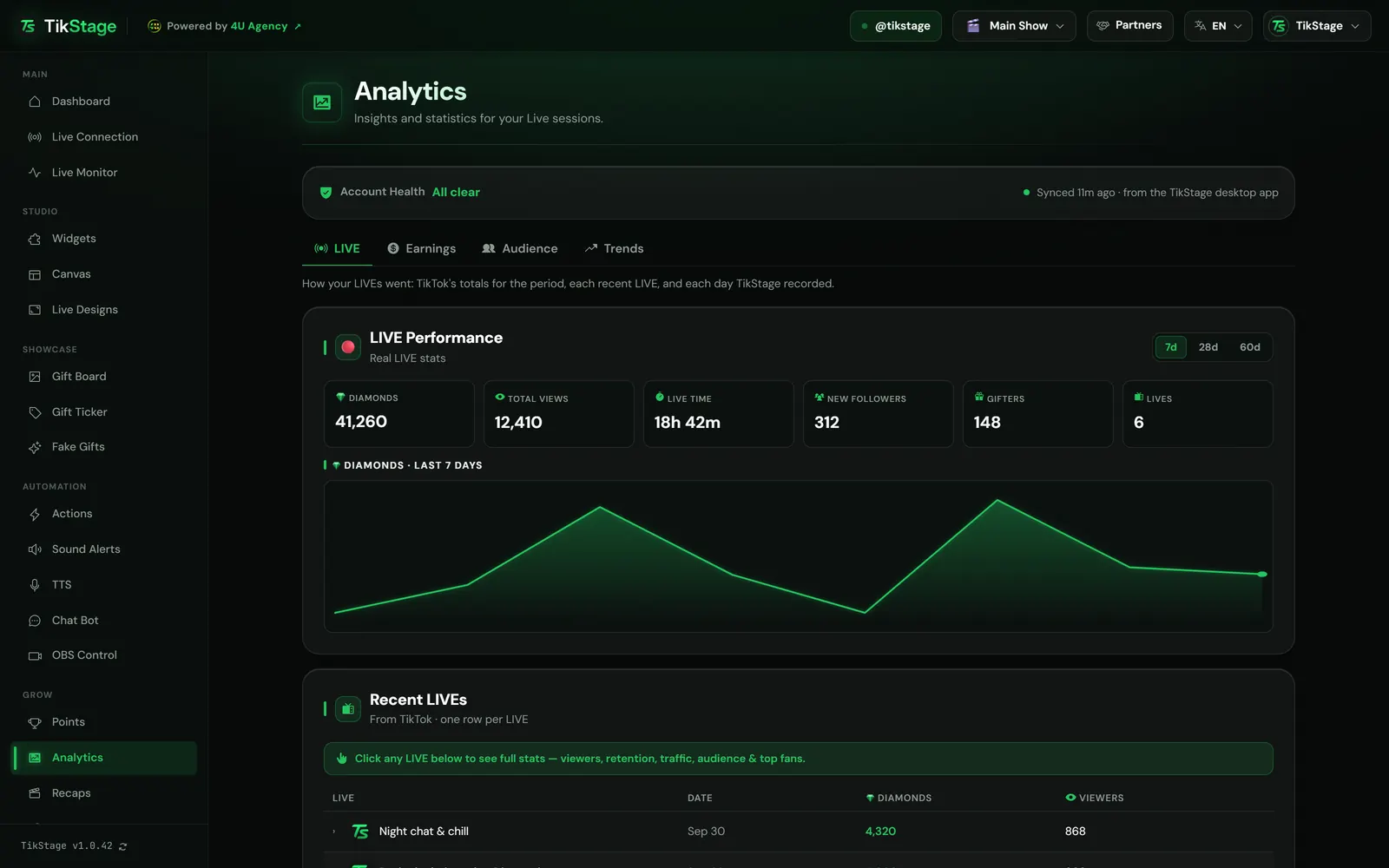
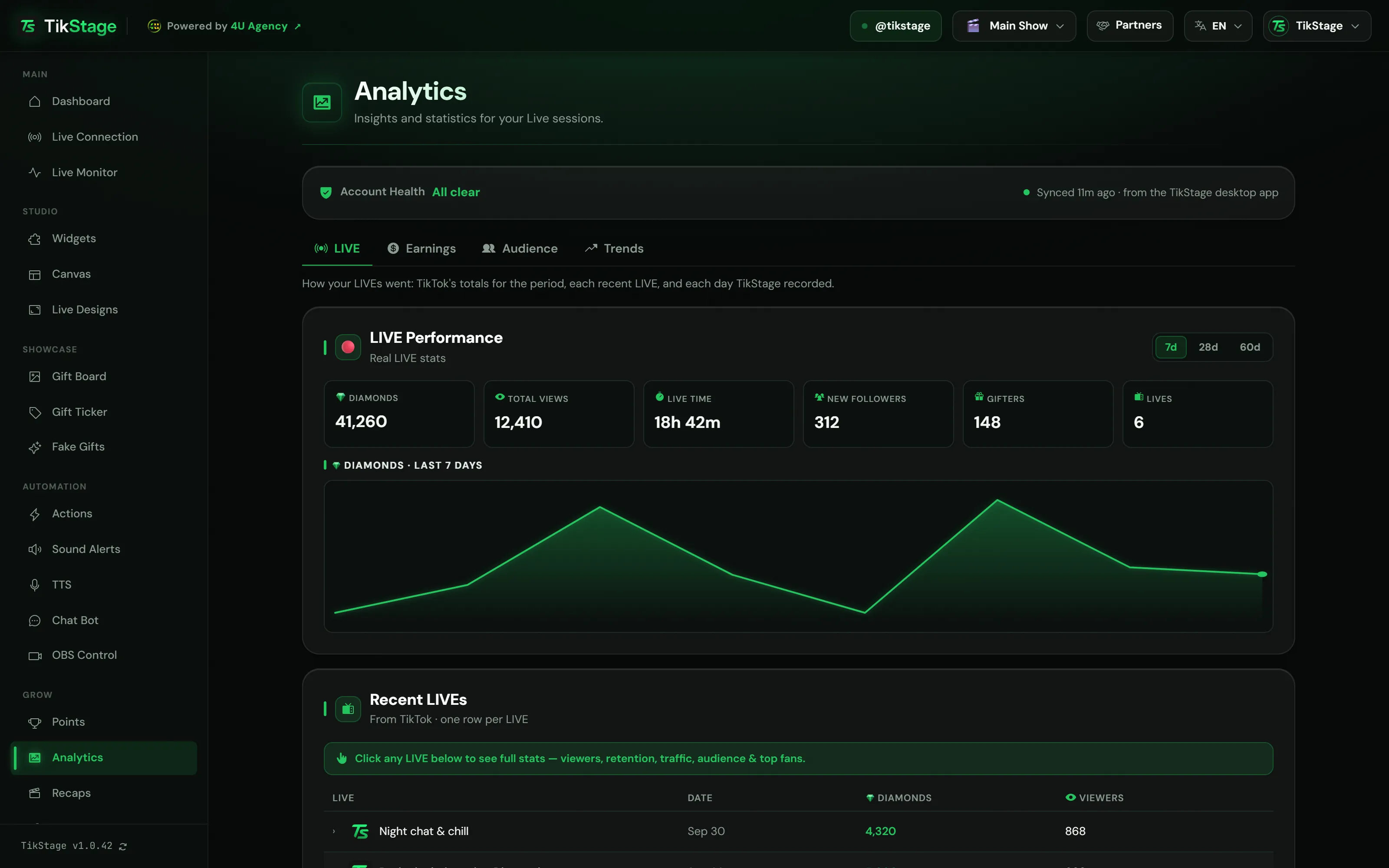
Open the LIVE tab of TikStage Analytics and click a LIVE under Recent LIVEs. It opens that LIVE's stats from TikTok: viewers, watch time, where viewers came from, who they were and your top fans.
At the top, LIVE Performance adds up the period: diamonds, total views, live time, new followers, gifters and the number of LIVEs, with a chart of diamonds by day. Recent LIVEs lists up to 8 LIVEs with their date, diamonds and viewers. A click on a row shows:
- The numbers: diamonds, gifters, unique viewers, peak viewers, average watch time, comments, likes, shares and new followers.
- Watch time by audience: how long followers and non-followers stayed, on average.
- Traffic sources: the share of viewers from LIVE recommend, Following, Video recommend, Shares and Others.
- Audience: female and male shares, age groups and regions.
- Top gifters and Top watchers: the top 5 by diamonds and by time watched.
Under it, Session History is TikStage's own record: one row per day with the date, duration, diamonds, gifts and gifters, 10 days per page.
04Earnings and audience
Can TikStage track my TikTok LIVE earnings?
Yes. The Earnings tab of TikStage Analytics shows your money as TikTok reports it: Scaled LIVE Rewards for your LIVEs and Creator Rewards for your videos. The Audience tab next to it shows your followers, Fan Club and top supporters.
| Card | Tab | What it shows |
|---|---|---|
| Scaled LIVE Rewards | Earnings | Per-LIVE mission rewards and weekly mission rewards in dollars, with their percentages, plus total diamonds and TikTok's tip when it gives one. |
| Creator Earnings | Earnings | Estimated Creator Rewards for your videos, from TikTok Studio, with the change from the previous period. |
| Followers & reach | Audience | Your follower count with its gain or loss and a chart, plus video views, profile views, likes, comments and shares. |
| Fan Club | Audience | Your Fan Club's name, total fans and active fans. |
| Top Supporters | Audience | TikStage's all-time diamond leaderboard: each supporter's diamonds, gifts and last gift, 10 per page. |
TikTok's cards appear only when TikTok has those figures for your account. With nothing synced, the Earnings tab reads Nothing from TikTok yet. On every plan, the Dashboard's Estimated earnings card also estimates this month's earnings from your diamonds, and uses TikTok's own figures when the app has them.
05Best time to go live
What is the best time to go live on TikTok?
TikStage answers it from your own LIVEs. Its Best Time to Go Live map shades every hour of the week by the diamonds TikStage recorded in it over the last 90 days, in your own timezone, and names your peak window.
It is on the Trends tab. Your peak window gives the weekday and hour that brought the most diamonds, and how many. A stronger green means more diamonds, from Less to More. With no gifts recorded in the last 90 days, it reads Not enough data yet.
Above it, Growth Trends compares This Week vs Last Week and This Month vs Last Month on diamonds, gifts and gifters, each with its change in percent, and charts Weekly Diamonds (Last 12 Weeks). The current week and month are compared while they are still running.
06Limits
What are the limits?
Analytics runs only in the Windows desktop app, TikTok's figures need your TikTok login in the app, and TikStage's own figures count only the gifts it saw while connected to your LIVE.
- Windows desktop app only: Analytics does not open in a web browser.
- Without your TikTok login in the app, the cards with TikTok's figures stay hidden or empty.
- TikTok's period totals go back 60 days at most, and Recent LIVEs shows up to 8 LIVEs.
- TikTok's figures refresh when the app starts and when a LIVE starts or ends, not continuously.
- Reset All Points on the Points page also deletes the gifts and supporters behind Top Supporters, Growth Trends and Best Time to Go Live.
07Is it free?
Is TikStage Analytics free?
No. Analytics is part of Premium. TikStage has a Free plan with no expiry date, which includes the Recaps videos and the Dashboard's earnings estimate but not Analytics.
Free plan
No Analytics
The page shows a Premium feature card. TikStage keeps recording your gifts meanwhile, up to the Free limits of 3,000 supporters or 250,000 diamonds, so upgrading opens on your history.
Premium
All of Analytics
All four tabs, every TikTok card the app syncs, and no supporter or diamond limit on what TikStage records.
08FAQ
More questions creators ask
Are these TikTok's numbers or TikStage's?
Both. LIVE Performance, Recent LIVEs, Earnings, Followers & reach and Fan Club come from TikTok through the desktop app; Session History, Top Supporters, Growth Trends and Best Time to Go Live count the gifts TikStage recorded.
Why does the Earnings tab say Nothing from TikTok yet?
Every figure on that tab comes from TikTok through the app. Log in with your TikTok account in the desktop app; it syncs when the app starts and whenever a LIVE starts or ends.
Can I see more than 60 days?
Not in TikTok's period totals, which stop at 60 days. TikStage's Session History keeps a row for each day it recorded.
Does TikStage make a video of my LIVE?
Yes, on every plan. After a LIVE TikStage was connected to, the Recaps page can turn it into a vertical 1080×1920 MP4 (without sound) with your diamonds, biggest gift and top fans, in a Bold or Collage style, and keeps your last 10 recaps.
Which timezone does the best time use?
Your computer's. The map counts your diamonds by weekday and hour over the last 90 days in that timezone.