01What it does
What does the TikStage Live Monitor do?
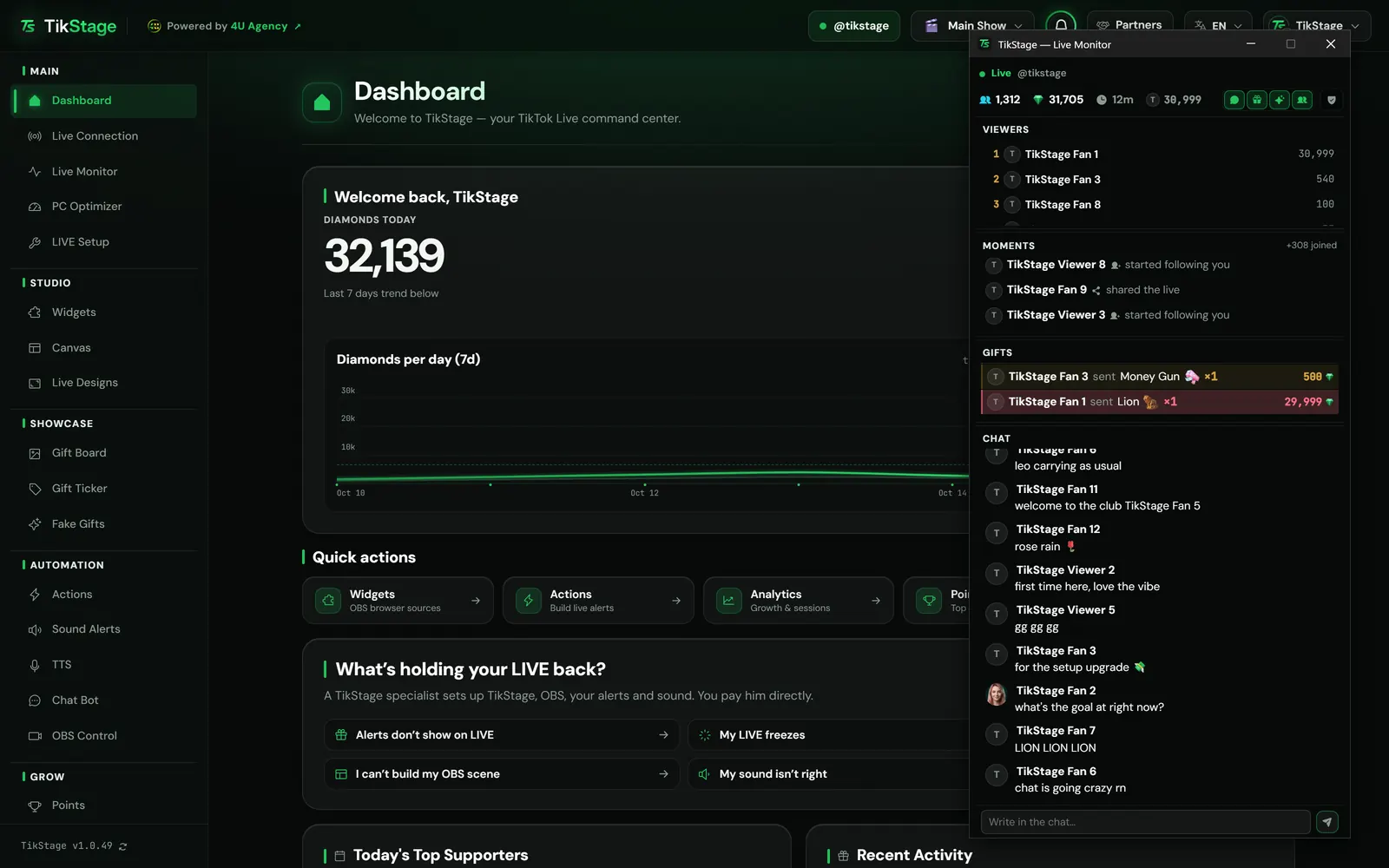
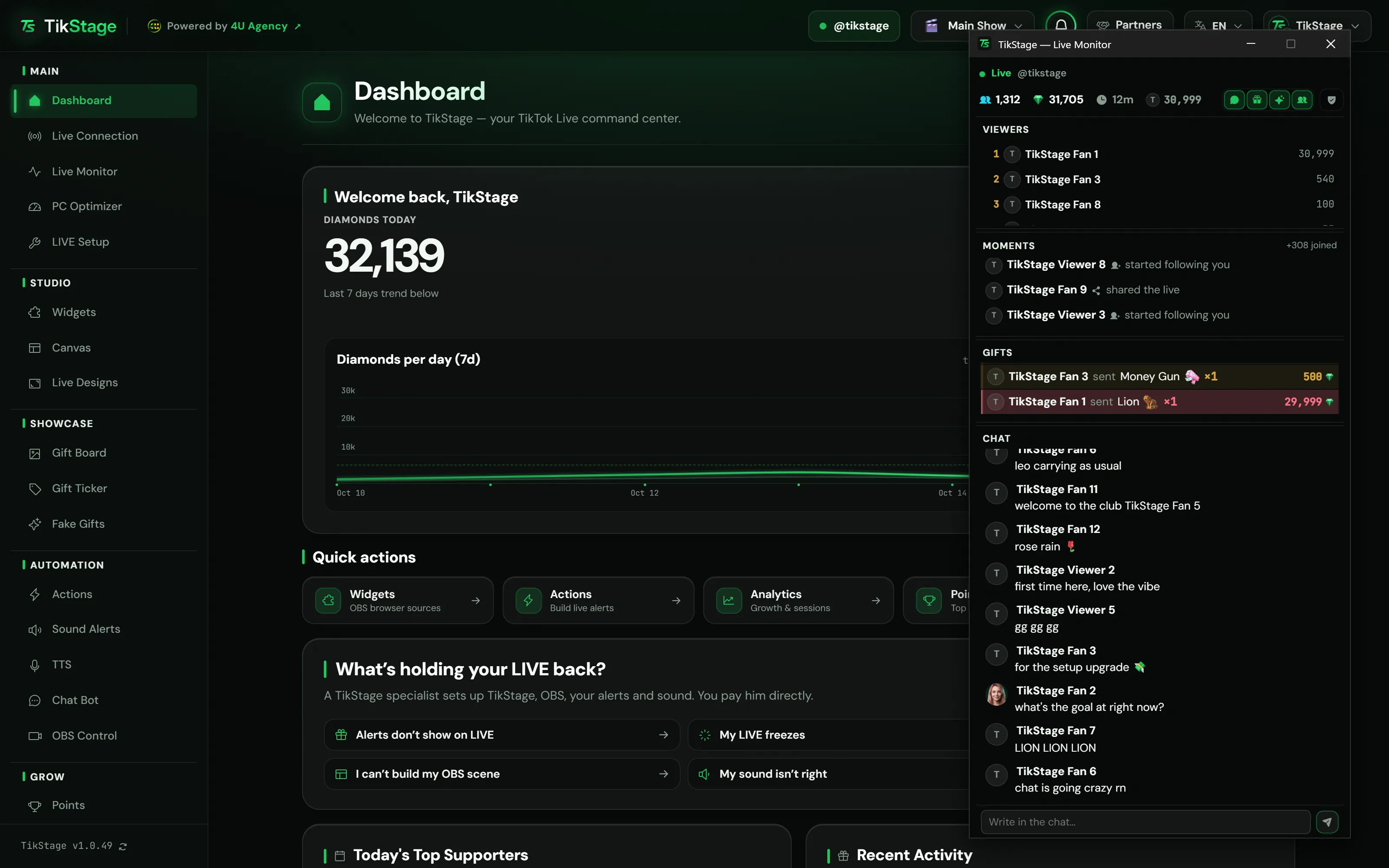
The TikStage Live Monitor puts your TikTok LIVE in one separate, narrow window: live numbers, TikTok's viewer ranking, follows and shares, gift combos and the chat. Click anyone to see who they are, answer in chat or moderate.
At a glance
| Plan | Free on every plan. Nothing in the Live Monitor needs Premium. |
|---|---|
| Where it runs | The TikStage desktop app for Windows, in a window of its own (400 × 1000 pixels to start, resizable). |
| What it needs | TikStage connected to your LIVE. Writing in chat and moderating also need your TikTok login in the app. |
| Big gifts | A combo of 500 diamonds or more fills the window for 5 seconds. |
| Sounds and actions | The window plays none, so keeping it open all LIVE doubles nothing. |
02How to open it
How do I open the Live Monitor for my TikTok LIVE?
In the TikStage desktop app, connect to your LIVE, then click Live Monitor in the sidebar. It opens in its own window, which you can park beside OBS or on a second screen.
Get the desktop app
The Live Monitor is part of the TikStage desktop app for Windows.
Download TikStage for WindowsConnect to your LIVE
Start your LIVE, then connect on the Live Connection page. Until then the monitor reads Not connected to a live.
How the Live Connection worksOpen Live Monitor
Click Live Monitor in the sidebar. It opens in its own window, and clicking again brings that same window forward.
Place and size it
Drag the line between two sections to resize them; a double-click resets. Ctrl + mouse wheel sets the text from 70% to 250%.
Choose your sections
The small buttons next to the numbers show or hide Chat, Gifts, Moments and Viewers. The shield button opens Moderation.
03The four sections
What does the Live Monitor show during my LIVE?
The TikStage Live Monitor shows a bar of live numbers, then four sections: Viewers, Moments, Gifts and Chat. In Moments, Gifts and Chat the newest row is at the bottom; scroll up and it stops moving until you jump back down.
| Part | What it shows |
|---|---|
| Number bar | The status, such as Live, Reconnecting or Not live, then viewers, diamonds (plus those in combos still running), TikTok's like count when it can be read, a timer since TikStage connected and your top gifter. |
| Viewers | TikTok's own ranking of the people active in the room: place, picture, name and coins. People who only watch are not on it. |
| Moments | Follows, subscriptions with their months, shares, treasure boxes (in gold), and moderators or known subscribers joining. Other joins are only counted in the header. |
| Gifts | One row per combo that counts up as it grows: the gift, ×N and its value in diamonds. Combos of 100, 1,000 and 10,000 diamonds stand out more at each step. |
| Chat | Messages with TikTok's badges and emotes, the message you pinned on TikTok for as long as TikTok shows it, and a box to write back. |
Big gifts are announced. When one combo reaches 500 diamonds, the monitor shows the sender, the gift with its ×N and the total across the whole window for 5 seconds, once per combo. It does not block your clicks, and the threshold has no setting.
Writing in chat. Type in Write in the chat… and press Enter or Send. The message goes into your own LIVE from your own TikTok account, up to 150 characters. Until you have confirmed once on that computer, a Send messages from my account button stands in for the box.
04Viewer card
How do I see who a viewer is during my TikTok LIVE?
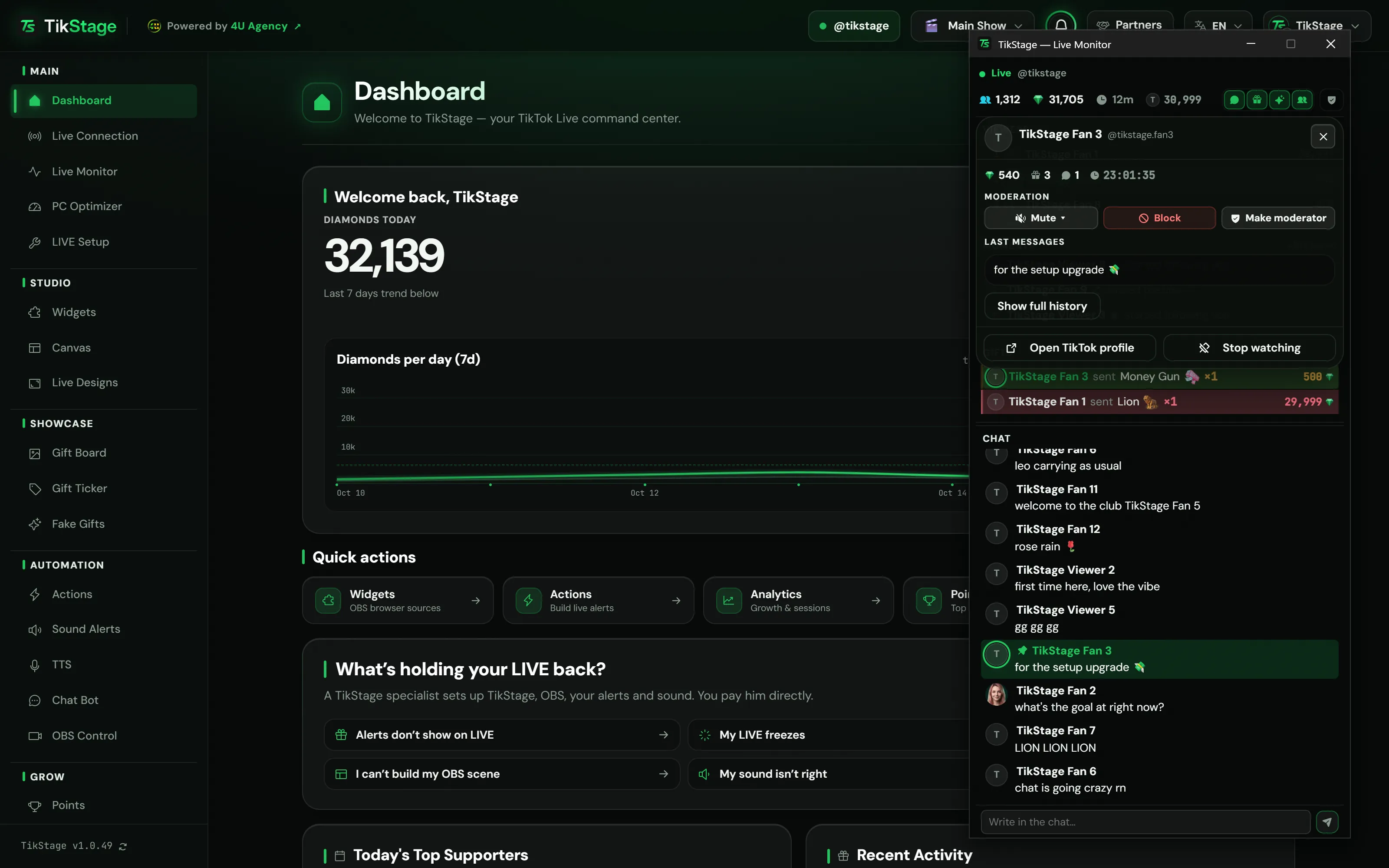
Click their row in any section of the TikStage Live Monitor. A card opens over the sections while the LIVE keeps running underneath, with what that person did in this LIVE and, if you ask, their all-time total with you.
- Their picture, name, @handle and TikTok badges, plus Follows you or Not following when TikTok answers.
- What they did in this LIVE: diamonds, gifts, messages and when TikStage first saw them.
- Their last 5 messages.
- Show full history: all-time diamonds, gifts and their real place among your supporters in TikStage Points.
- Open TikTok profile and the moderation buttons.
Keep an eye on them marks that person's rows in green in every section while the window stays open.
05Moderation
How do I moderate my TikTok LIVE from TikStage?
From the TikStage Live Monitor. The viewer card mutes, blocks or makes someone a moderator; the shield button opens a Moderation panel with TikTok's lists, filtered words, a log and a comments switch.
On a person. Mute offers TikTok's five lengths: 5 s, 30 s, 1 min, 5 min or This LIVE. Block removes them from this LIVE, with no way back into it, and asks first, like Remove moderator. Chips show Blocked, Moderator or how long a mute lasts, and a short history lists what was done to them. In the separate window the tabs are icons; hover for their names.
| In the panel | What it does |
|---|---|
| Muted | TikTok's list of muted people, read when you open the tab, each with Unmute. |
| Blocked | Who is blocked, each with Unblock. |
| Moderators | Your moderators, each with Remove moderator. |
| Filtered words | Add a word of up to 30 characters to your filtered words on TikTok, or remove one. |
| Log | The last 100 moderation actions taken from TikStage, with the time, the person and any refusal marked. |
| Comments | On and Off turn comments on or off in your LIVE. |
06Limits
What are the limits?
The TikStage Live Monitor runs only in the Windows desktop app while TikStage is connected to your LIVE, and it can only show what TikTok shares.
- Windows desktop app only: no Live Monitor in a web browser, and no Mac build.
- New rows arrive only while TikStage is connected to your LIVE. Closing the main TikStage window closes the monitor too.
- Viewers is TikTok's ranking of people who contributed, not a list of everyone watching.
- Writing in chat and moderating need your TikTok login in the app and a running LIVE. You can only write into your own LIVE.
- TikStage cannot read whether comments are on, so the Comments switch only marks the last button you pressed. A big gift covers the chat for its 5 seconds.
07Is it free?
Is the Live Monitor free?
Yes. The TikStage Live Monitor, writing in chat and moderation included, is free on every plan, including TikStage's Free plan with no expiry date.
Free plan
The whole Live Monitor
All four sections, the viewer card, big-gift announcements, writing in chat and moderation.
08FAQ
More questions creators ask
Does the Live Monitor show everyone watching my LIVE?
No. Viewers is TikTok's ranking of people who contributed; the number bar shows how many are watching.
Can I open the Live Monitor in the middle of a LIVE?
Yes. It fills with the recent part of the current LIVE that TikStage received, then keeps going.
Will it play my alerts or text-to-speech twice?
No. The monitor window plays no sounds and fires no actions. Those run once, in the main TikStage window.
Is the Live Monitor the same as the Chat Bot?
No. In the monitor you type each message yourself. The Chat Bot, part of Premium, posts thank-yous, command replies and announcements for you.
Can I change the 500-diamond threshold for big gifts?
No. It is the same for everyone and has no setting.
Does it remember my layout?
Yes. The sections you show, how tall each one is and the text size are remembered on that computer.