
01What it does
What does the TikStage auction do on TikTok LIVE?
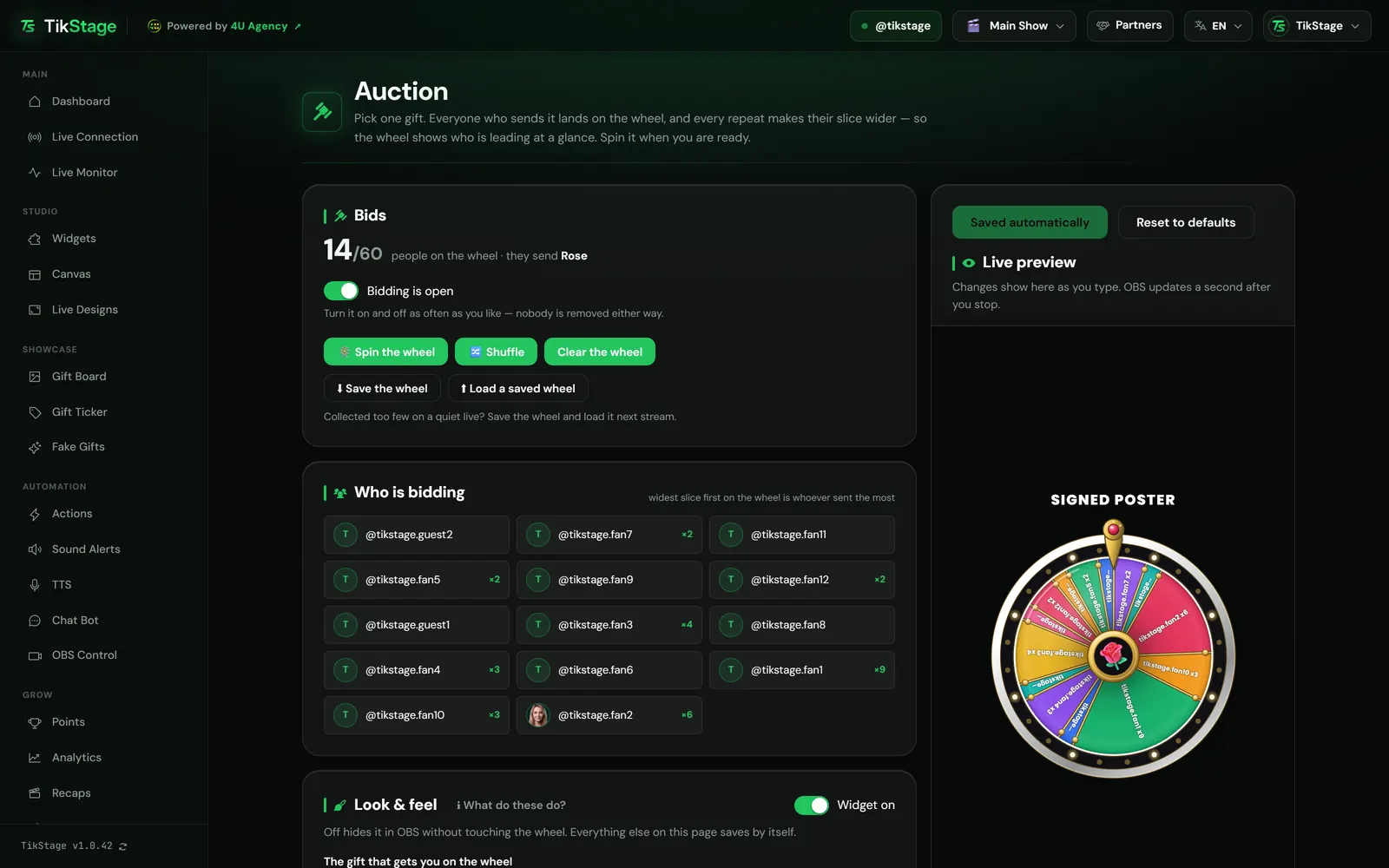
TikStage's Auction runs a gift auction on a wheel. You pick one gift; every viewer who sends it gets a slice with their name, every repeat widens that slice, and when you press Spin the wheel TikStage picks the winner, weighted by how many gifts each person sent.
At a glance
| Plan | Premium. On the Free plan the page shows a demo of the wheel. |
|---|---|
| Where it runs | The Auction page of the TikStage desktop app for Windows. The wheel is a link for OBS. |
| How viewers bid | By sending the one gift you choose while the bidding is open. Likes, comments and other gifts do not count. |
| What a send is worth | Each send counts once, whatever the gift costs. |
| The winner | Picked at random when you press Spin the wheel, weighted by gifts sent. |
| Bidders per wheel | Up to 60 people. |
02How to set it up
How do I run an auction on my TikTok LIVE?
Install the TikStage desktop app for Windows, pick the gift that gets viewers on the wheel, add the overlay link to OBS once, connect TikStage to your LIVE and switch the bidding on. When you are ready, press Spin the wheel.
Get the desktop app
The Auction page is in the TikStage desktop app for Windows, under Audience in the sidebar.
Download TikStage for WindowsPick the gift
Under The gift that gets you on the wheel, choose one gift. Until you do, nobody can get on the wheel.
Add the overlay to OBS
Under Overlay link, press Copy and add the link in OBS as a Browser Source. The link never changes, so you do this once.
Open the bidding
Once TikStage is connected to your TikTok LIVE, turn the bidding switch on so it reads Bidding is open. Bidders appear under Who is bidding.
Spin the wheel
Press Spin the wheel. The bidding closes, the wheel spins on stream and lands on the winner.
03Bidding
How do viewers bid in a TikTok LIVE auction?
They send the gift you chose while the bidding is open. The first send puts them on the wheel, and every further send of that gift adds to their count and widens their slice, so the wheel shows who is leading at a glance.
Only the number of sends counts, not what the gift costs, and a combo counts every gift in it. Regional versions of the same gift all count. Turning the bidding off and on never removes anyone.
The wheel holds up to 60 people. When it is full, the page says so and names anyone new who was turned away; people already on it can still raise their bid.
Save the wheel downloads the bidders and their counts as a .json file, and Load a saved wheel puts them back, for example on your next stream when a quiet LIVE collected too few. Load it once TikStage is connected to that LIVE, since connecting to a new LIVE empties the wheel. Loading replaces the current wheel, and asks first if people are on it.
04The winner
How is the auction winner picked?
When you press Spin the wheel, TikStage picks the winner at random, weighted by gifts sent, before the wheel moves. Someone with five gifts has five times the chance of someone with one, but anyone on the wheel can win.
The spin closes the bidding, and the page shows Last winner: @name right away. On stream, the wheel lands on them and flips to a winner card with their photo (or initial), @name and number of gifts.
Each round spins once. To spin again, switch the bidding back on (everyone stays, the last winner too) and press Spin the wheel, or press Clear the wheel to start from zero. Shuffle mixes the order of the slices without changing anyone's chance.
05The overlay
What does the auction look like on stream?
A wheel of names in OBS: each slice is a bidder, as wide as their share of the gifts, your chosen gift sits in the middle and your title above. It stays on screen between spins, so viewers can watch their own slice grow.
| Setting | What it changes |
|---|---|
| Title | Text above the wheel, up to 40 characters. Empty hides it. |
| Spin seconds and Full turns | How long and how fast it spins: 3 to 20 seconds, 3 to 8 turns. Neither changes who wins. |
| Hold winner (s) | How long the winner card stays up: 2 to 15 seconds. |
| Wheel size % | 50 to 160, so it fits without resizing the source in OBS. |
| Wheel sounds | A start sound, a tick per slice and a landing sound, heard in OBS and muted in the page's preview. |
You also pick the font, four colours and a slow drift while idle. Everything saves by itself, and Widget off hides the wheel in OBS without touching the bidders. To use the link in TikTok LIVE Studio, see the overlays guide.
06Limits
What are the limits?
The Auction is part of Premium, runs from the Windows desktop app, and counts only the one gift you chose while TikStage is connected to your LIVE and the bidding is open.
- Windows desktop app only for the Auction page: not in a browser, no Mac build.
- One gift per auction and up to 60 people. Coin value does not matter, only the number of sends.
- The winner is a weighted chance, not always the top bidder, and is not posted in chat.
- Connecting to a new LIVE empties the wheel and closes the bidding, so load a saved wheel after you connect. Test gifts from the Simulator never put anyone on it.
- The overlay's fixed words (Winner, and the gift count such as 6 gifts) are in English. The title is your own text.
07Is it free?
Is the TikStage auction free?
No. The Auction is part of Premium. TikStage has a Free plan with no expiry date, but running an auction is not in it.
Free plan
Demo only
The page shows an Auction is a Premium widget card and a demo of the wheel with invented names. Bidding, spinning and loading a wheel are switched off.
Premium
The whole Auction
Bidding, spins, Shuffle, saved wheels and the overlay link for OBS.
08FAQ
More questions creators ask
Does the viewer who sends the most gifts always win?
No. The winner is drawn at random, weighted by gifts: five gifts give five times the chance of one, but anyone on the wheel can win.
Do expensive gifts count more?
No. Only the gift you chose counts, and every send counts the same, whatever it costs.
Is there a countdown?
No. You decide when to close the bidding and when to press Spin the wheel.
Is the winner announced in chat?
No. The winner appears on the overlay's winner card and on the Auction page.
Does the wheel carry over to my next LIVE?
No. A new LIVE starts with an empty wheel, but you can save it with Save the wheel and load it on your next stream once TikStage is connected.