01What it does
What is a TikTok LIVE recap video in TikStage?
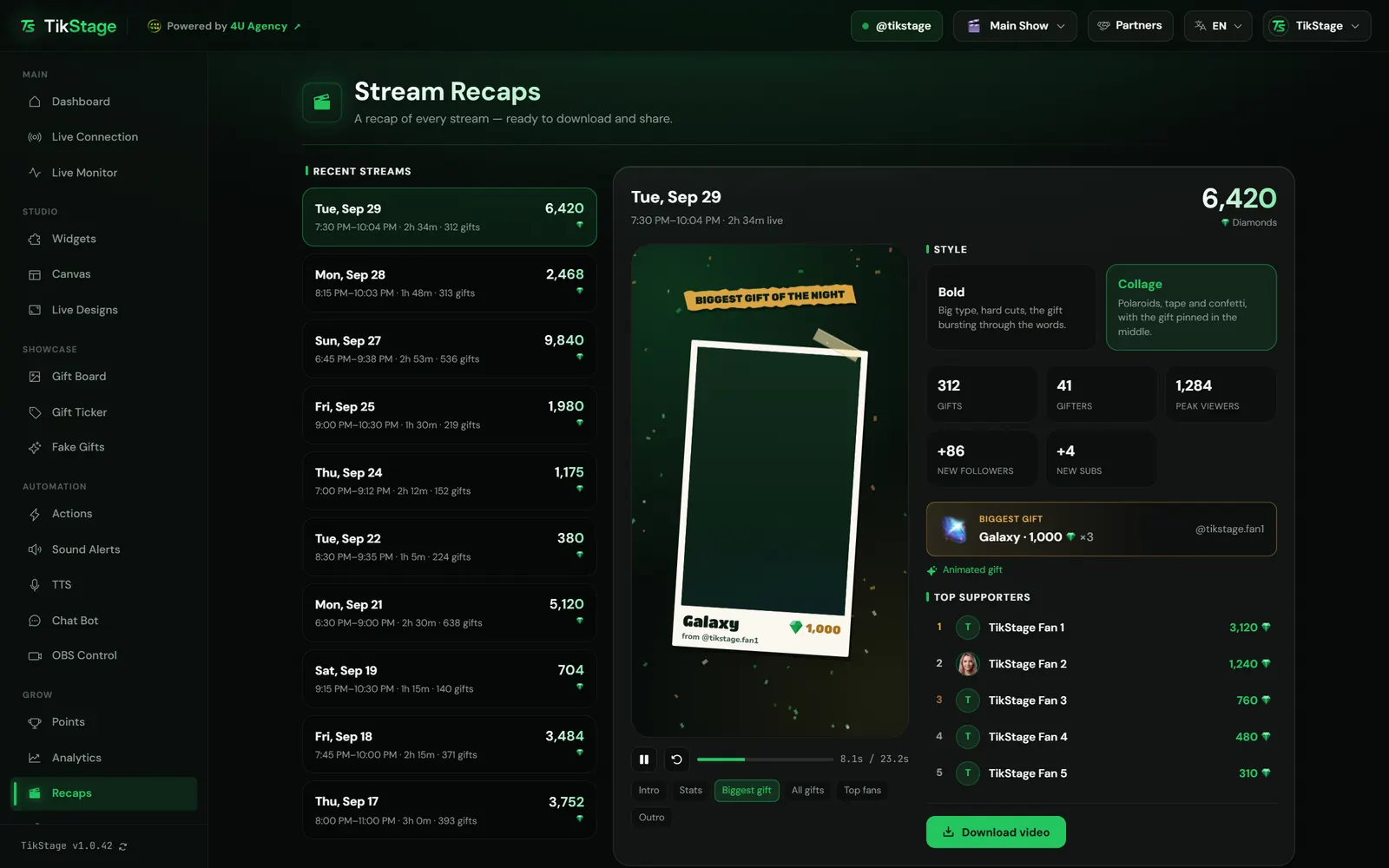
A TikStage recap is a short vertical MP4 video of one TikTok LIVE: your diamonds, your stats, your biggest gift, the gifts of the night and your top 5 fans. TikStage writes the recap when a LIVE it is connected to ends, and the Recaps page turns it into a video you download.
At a glance
| Plan | Free and Premium. Recaps are on every plan. |
|---|---|
| Where it runs | The TikStage desktop app for Windows, under Grow in the sidebar. Not in a web browser. |
| Made from | What TikStage counted while it was connected to your LIVE. |
| Video | Vertical 1080×1920 (9:16) MP4, 60 frames per second, no sound. |
| Length | About 10 to 30 seconds, depending on your gifts. |
| Kept | Your newest 10 recaps. |
02How to make one
How do I make a recap video of my TikTok LIVE?
Connect TikStage to your LIVE as usual. When the LIVE ends, open Recaps in the TikStage desktop app, pick a style and press Download video.
Get the desktop app
Recaps is a page of the TikStage desktop app for Windows.
Download TikStage for WindowsConnect TikStage to your LIVE
Go live and connect TikStage as usual; the live connection guide shows how. The recap counts what TikStage sees while it is connected.
End your LIVE
TikStage writes the recap when the LIVE ends or when you disconnect. If the app is open on another page, a green banner says your recap is ready, with a Make the video button.
Pick a style
Open Recaps, choose the LIVE under Recent streams, then Bold or Collage. The preview plays on its own.
Download the video
Press Download video. The button counts up in percent while your computer renders the MP4, then the file downloads.
03What it shows
What does the TikTok LIVE recap video show?
A TikStage recap video shows the highlights of one LIVE, scene by scene: a thank-you intro, your diamonds and stats, the biggest gift with its animation, the gifts of the night, your top 5 fans and a closing thank-you.
| Scene | What it shows |
|---|---|
| Intro | Your avatar and name with a thank-you that fits the hour you went live, such as "Thank you for tonight". |
| Diamonds | The diamonds of the LIVE, with its duration and peak viewers. Bold only; Collage counts them up in Stats. |
| Stats | Duration, gifts, gifters and peak viewers, plus new followers and new subs when there were any. |
| Biggest gift | The single most valuable gift, its name, price and sender, played with the gift's own animation. |
| All gifts | Up to 12 different gifts of the night, with how many of each. |
| Top fans | Your top 5 viewers by diamonds sent in that LIVE. |
| Outro | "Thank you to everyone who showed up", your name and tikstage.com. |
A scene with nothing to show is left out: a LIVE without gifts has no gift, gift wall or fans scenes. A video runs about 10 to 30 seconds: longer with a long gift animation and many gifts. When the biggest gift has no animation, the video shows its icon instead. The words follow the language of the app.
04Styles
Can I choose how the recap video looks?
Yes, a TikStage recap video comes in two styles: Bold and Collage. One click switches the preview to the other style, and the app remembers your last choice on that computer.
| Style | Look |
|---|---|
| Bold | Big type, hard cuts, the gift bursting through the words. The TikStage name and the date sit at the top of every frame. |
| Collage | Polaroids, tape and confetti, with the gift pinned in the middle. |
The preview has play, pause and restart buttons, and a button for each scene to jump straight to it. Beyond the style, the video cannot be edited: there are no text, colour or scene options.
05Download
How do I download a TikTok LIVE recap as an MP4?
Press Download video on the Recaps page. The TikStage desktop app renders the video on your own computer, frame by frame, and downloads it as an MP4 file.
- 1080×1920 pixels, vertical 9:16.
- 60 frames per second, H.264 video, no sound.
- Named like
tikstage-recap-2026-09-29-bold.mp4: the LIVE's date, then the style. - While it renders, the button shows the progress in percent and the style cards are locked.
06Limits
What are the limits?
Recaps cover only LIVEs TikStage was connected to, keep your newest 10, and make a silent video in one of two fixed styles.
- Windows desktop app only, not in a web browser.
- Only LIVEs TikStage was connected to, counted from what it saw while connected. A LIVE with no gifts, no diamonds and under 2 minutes gets no recap.
- Only your newest 10 recaps are kept. Download the videos you want to keep.
- The video has no sound, and its TikStage branding (tikstage.com at the end, plus the TikStage name on every frame in Bold) cannot be switched off.
- On the Free plan, once Points stops counting at 3,000 supporters or 250,000 diamonds, new recaps show 0 gifters and have no top fans, biggest gift or gift wall.
07Is it free?
Are TikStage recaps free?
Yes. TikStage Recaps are on every plan, including the Free plan with no expiry date, and there is no separate Recaps tier.
Free plan
All of Recaps
Every recap, both styles and the MP4 download. Past the Free limits of 3,000 supporters or 250,000 diamonds, new recaps lose their gifters count, top fans, biggest gift and gift wall.
Premium
All of Recaps
The same Recaps, with no supporter or diamond limit on what TikStage records.
08FAQ
More questions creators ask
Does every LIVE get a recap?
Every LIVE TikStage was connected to, except one with no gifts, no diamonds and under 2 minutes.
Does the recap video have music?
No. The MP4 has no sound at all.
Do test gifts from the Simulator end up in my recap?
No. What you fire from the Simulator in Actions is left out of the recap.
Can I make the video in a browser or on my phone?
No. Recaps is a page of the TikStage desktop app for Windows, and the video is made on that computer.
How long does TikStage keep a recap?
TikStage keeps your newest 10 recaps. When a new one is written, the oldest beyond those 10 is deleted.