01What it does
What does TikStage Fake Gifts do on TikTok LIVE?
TikStage Fake Gifts plays a TikTok gift's real animation on your stream, full-screen and with sound, in its own OBS browser source. You press a gift, or, with Premium, let a viewer's gift play the animation you chose. It is a fake gift effect for the show, not a gift: nothing is added to your points, leaderboards or alerts.
At a glance
| Plan | Premium. The Free plan includes 5 plays in total to try it. Gift rules play on Premium only. |
|---|---|
| Where it runs | The Fake Gifts page of the TikStage desktop app for Windows. The animation plays on a browser source in OBS or LIVE Studio. |
| What plays | A gift's real full-screen animation with its sound. Only gifts that have one are listed. |
| Two ways to play | Press a gift yourself, or, with Premium, let a viewer's gift play the animation you chose. |
| Your numbers | Untouched. Nothing goes to points, leaderboards, alerts or actions. |
| Live connection | Not needed to press a gift. Gift rules react to gifts on your LIVE. |
02How to set it up
How do I add gift animations to my TikTok LIVE?
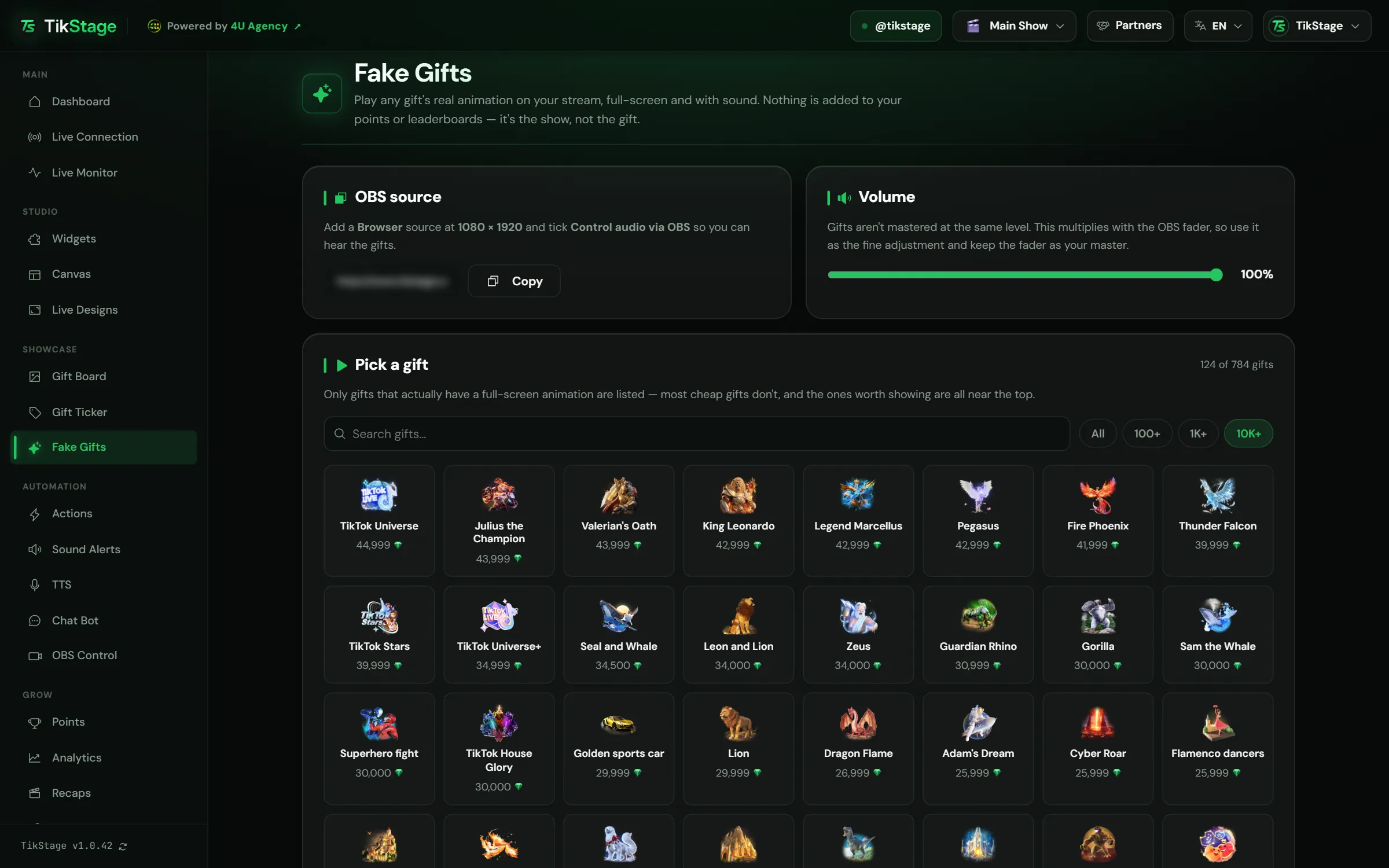
Open Fake Gifts in the TikStage desktop app, copy its link into a 1080 × 1920 browser source in OBS with audio control ticked, then press a gift. The animation plays on that source, full-screen and with sound.
Get the desktop app
Fake Gifts is a page of the TikStage app for Windows, under Showcase in the sidebar.
Download TikStage for WindowsAdd the OBS source
In the OBS source card, press Copy. In OBS, add a Browser source with that link at 1080 × 1920 and tick Control audio via OBS.
Set the volume
Move the Volume slider until the gifts sit well with the rest of your sound. It starts at 100%.
Press a gift
Pick one in the grid. The page confirms that it is playing, or warns you that no OBS source is listening.
Add gift rules if you want
With Premium, the Gift animations card plays an animation by itself when a viewer sends the gift you chose.
03Playing a gift
Which gift animations can I play on my stream?
Any gift in the TikStage Fake Gifts grid. It lists only the gifts that have a real full-screen animation, most expensive first, and pressing one plays it on your Fake Gifts source with its sound.
Search by name, or narrow the grid with the price filters All, 100+, 1K+ and 10K+. The grid opens on 1K+, because most cheap gifts have no full-screen animation. Each tile shows the gift's picture, its name as TikTok spells it, and its price.
You do not need to be connected to a LIVE to press a gift: the animation goes to your source either way, so you can check your setup before you go live.
04Gift animations
Can a viewer's gift play a different animation?
Yes, with TikStage's Gift animations rules on Premium. You choose a gift, such as a Rose, and the animation it plays, such as the Lion: every Rose a viewer sends then plays the Lion animation once on your Fake Gifts source, with the viewer's name on the banner.
- The gift a viewer sends can be any TikTok gift, the cheap ones included. The animation must be a gift that has a full-screen animation.
- One rule per gift, up to 100 rules per stream profile. Each stream profile has its own rules.
- Each rule has an Active switch, and the card has an On switch for all of them.
- Rules play only while your Fake Gifts source is open in OBS or LIVE Studio. The card warns you when it is not.
- To try a rule without going live, send that gift from the Simulator tab of the Actions page (Alerts and actions guide).
- On the Free plan you can set rules up now. They start playing when you go Premium and never use your free plays.
05Sound and volume
How do I hear the gift sound in OBS?
Tick Control audio via OBS on the TikStage Fake Gifts browser source, so you can hear the gifts. The page's Volume slider multiplies with that source's fader: use the slider as the fine adjustment and keep the fader as your master.
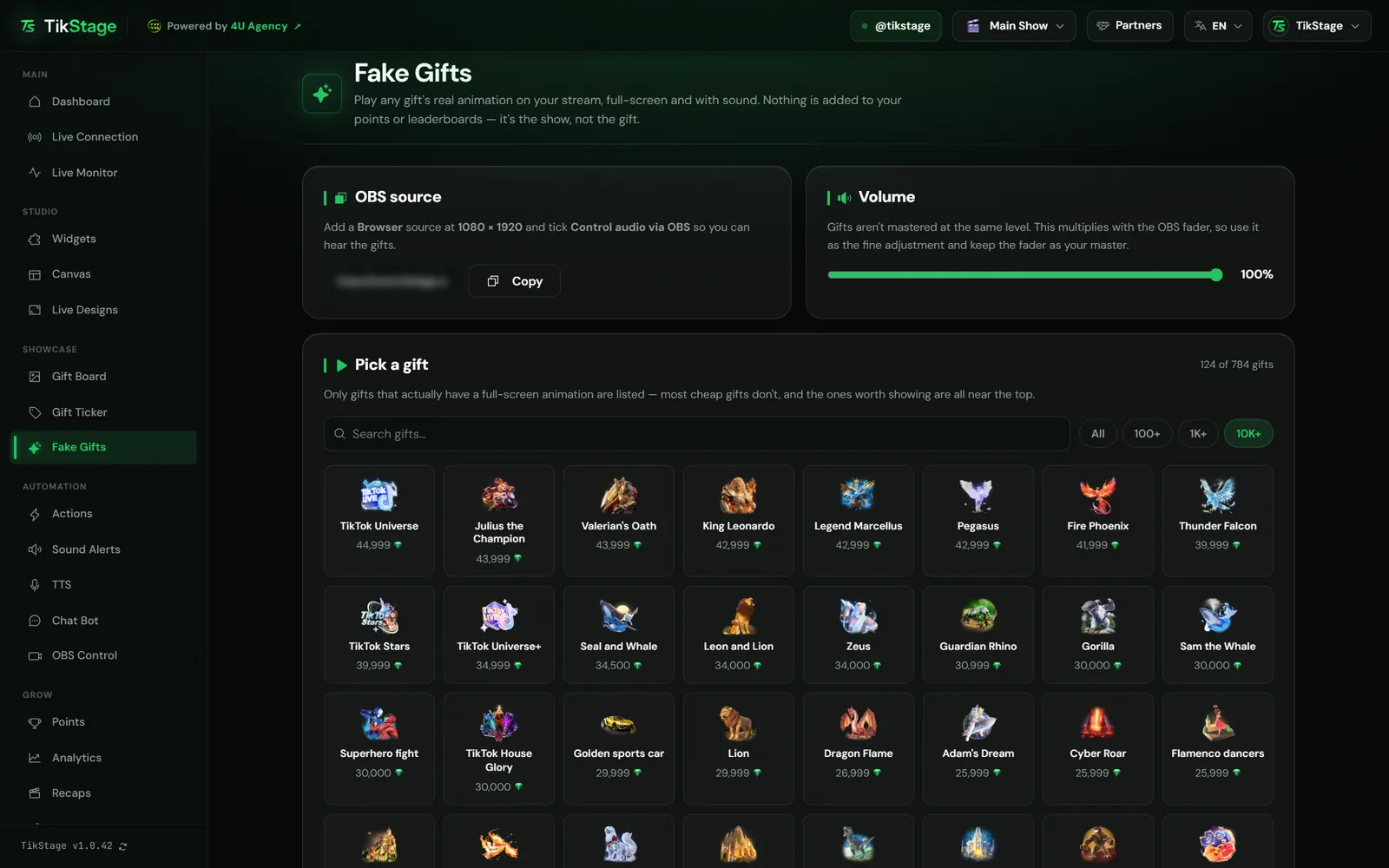
Gifts are not all mastered at the same level, which is why the slider exists. It starts at 100% and is saved for your account, so it stays where you left it between LIVEs.
06Limits
What are the limits?
TikStage Fake Gifts is a show effect only, it plays only gifts that have a full-screen animation, and gift rules need Premium.
- It is the show, not the gift: nothing goes to your points, leaderboards, alerts or actions. To test alerts and actions, use the Simulator.
- Only gifts with a full-screen animation can play, and most cheap gifts have none.
- Animations play one at a time. When many arrive at once, a few wait their turn and the rest are skipped.
- You press gifts in the Windows desktop app, and nothing shows unless the Fake Gifts source is open in OBS or LIVE Studio.
- Free plan: 5 plays in total, for the life of the account. Gift rules play on Premium only.
07Is it free?
Is Fake Gifts free?
Partly. TikStage Fake Gifts is a Premium feature, and the Free plan with no expiry date includes 5 plays in total to try it. Gift rules play on Premium only.
Free plan
5 plays in total
Five presses in the grid, ever; the page shows how many are left. A press counts even when no OBS source is open, so add the source first. You can set up gift rules, but they do not play.
Premium
Unlimited plays
Press gifts as often as you like, and your gift rules play on your LIVE.
08FAQ
More questions creators ask
Does a fake gift count as a real gift?
No. It plays the gift's animation and sound on your Fake Gifts source, but no gift is sent to TikTok, and nothing is added to your points, leaderboards or alerts.
Do I need to be live to use it?
Not to press a gift: it plays on your source even when TikStage is not connected to a LIVE. Gift rules react to gifts on your LIVE, or to a gift from the Simulator.
Do the 5 free plays reset every month?
No. Free accounts get 5 plays in total, not per day or per month. Premium has unlimited plays.
Why can't I find a gift in the list?
Only gifts that have a full-screen animation are listed, and most cheap gifts do not have one. Try the All filter too, since the grid opens on 1K+.
Is Fake Gifts on the Widgets page?
No. Its OBS link is only on the Fake Gifts page, in the OBS source card.