01What it does
What does the TikStage Gift Board do?
The TikStage Gift Board is an editor for gift legend pictures. You pick one TikTok gift, type what it does, style the card with effects and download it as a transparent PNG to show on your LIVE.
At a glance
| Plan | The editor is on every plan. Downloading the PNG is Premium; on Free the preview carries a watermark. |
|---|---|
| Where it runs | The TikStage desktop app for Windows, in the sidebar under Showcase › Gift Board. Not in a web browser. |
| What you make | A square card: one gift, your text and the effects you switch on. |
| The file | A transparent PNG, 312 × 312 or 624 × 624 pixels. |
| Effects | 13 effect systems with 62 variants, and 51 fonts for the text. |
| Needs | A TikStage sign-in. You do not need to be live or connected to TikTok. |
02How to make one
How do I make a gift legend for my TikTok LIVE?
Open the Gift Board in the TikStage desktop app, choose a gift, type what it does, switch on a few effects and download the PNG. Then add the picture to your LIVE like any other image.
Open the Gift Board
In the Windows app, open Gift Board in the sidebar's Showcase group, or from a game's page in Troll Games, under Show your viewers what each gift does.
Download TikStage for WindowsChoose a gift
Press Choose a gift and search the catalog by name, for example Rose or Lion. Drag the gift to move it; its grips resize and turn it.
Write what it does
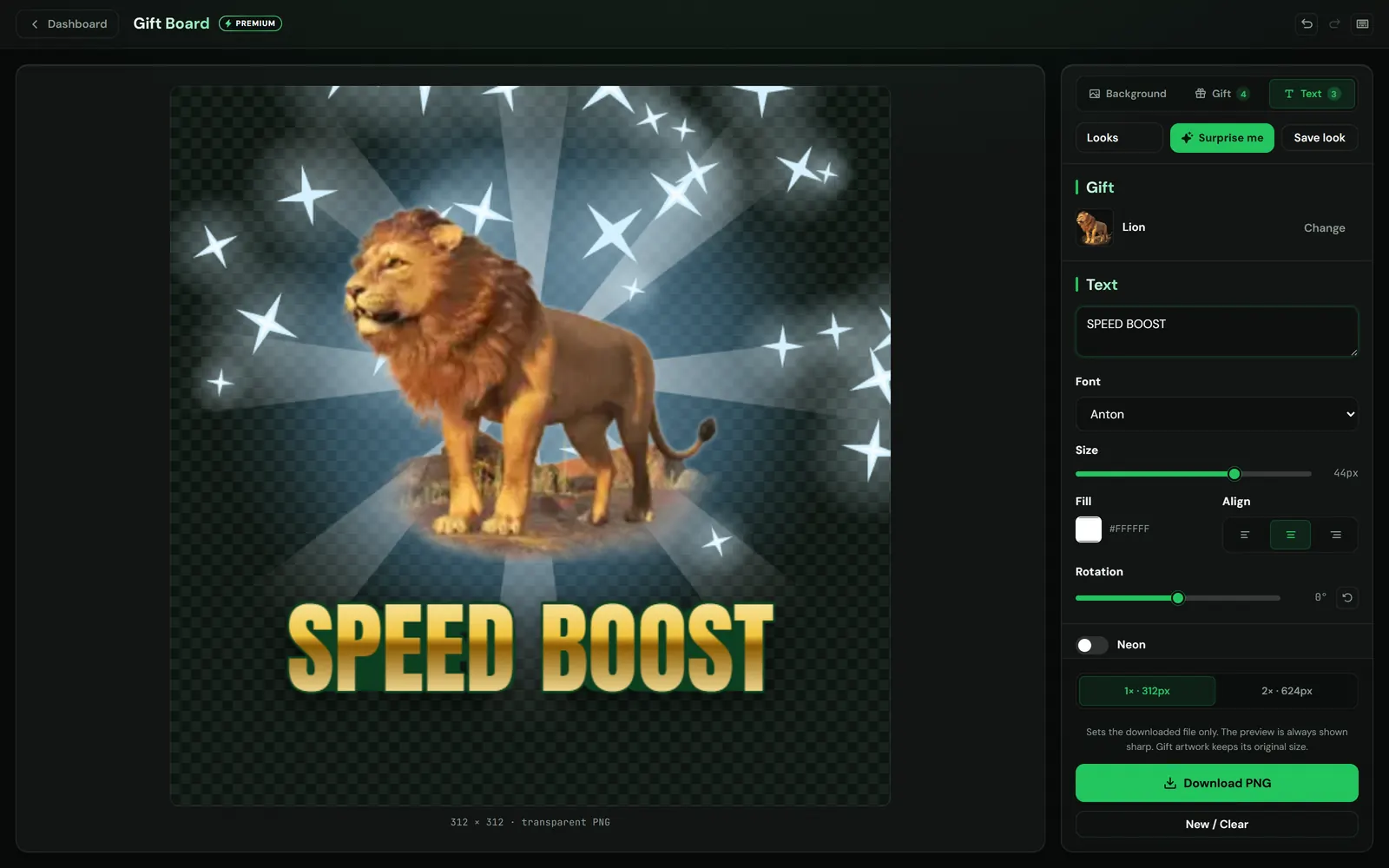
On the Text tab, type what the gift does, such as "Speed boost", then pick the font, size, colour and alignment.
Style it
Switch on effects in the Background, Gift and Text tabs, or press Surprise me for a ready combination.
Download and add it
Choose 1× · 312px or 2× · 624px, press Download PNG (Premium), and add the file as an image in your streaming software, such as TikTok LIVE Studio or OBS.
03Effects
What can I change on a gift card?
On the TikStage Gift Board you change the look of the card, the gift and the words. Three tabs, Background, Gift and Text, hold 13 effect systems; each one has a switch, picture chips for its variants and a Fine-tune drawer.
| Tab | Effect systems | Some of the variants |
|---|---|---|
| Background | Background fill, Tone & texture, Frame | Gradient, Sunburst, Hexagons, Vignette, a Neon or Metallic frame |
| Gift | Halo, Ray burst, Medallion, Sparkles, Shadow & glow | Aura, Beams, Coin, Confetti, Sticker |
| Text | Neon, 3D depth, Second outline, Outline & shadow, Text fill | Tube, Arcade, Stitched, Gold, Chrome |
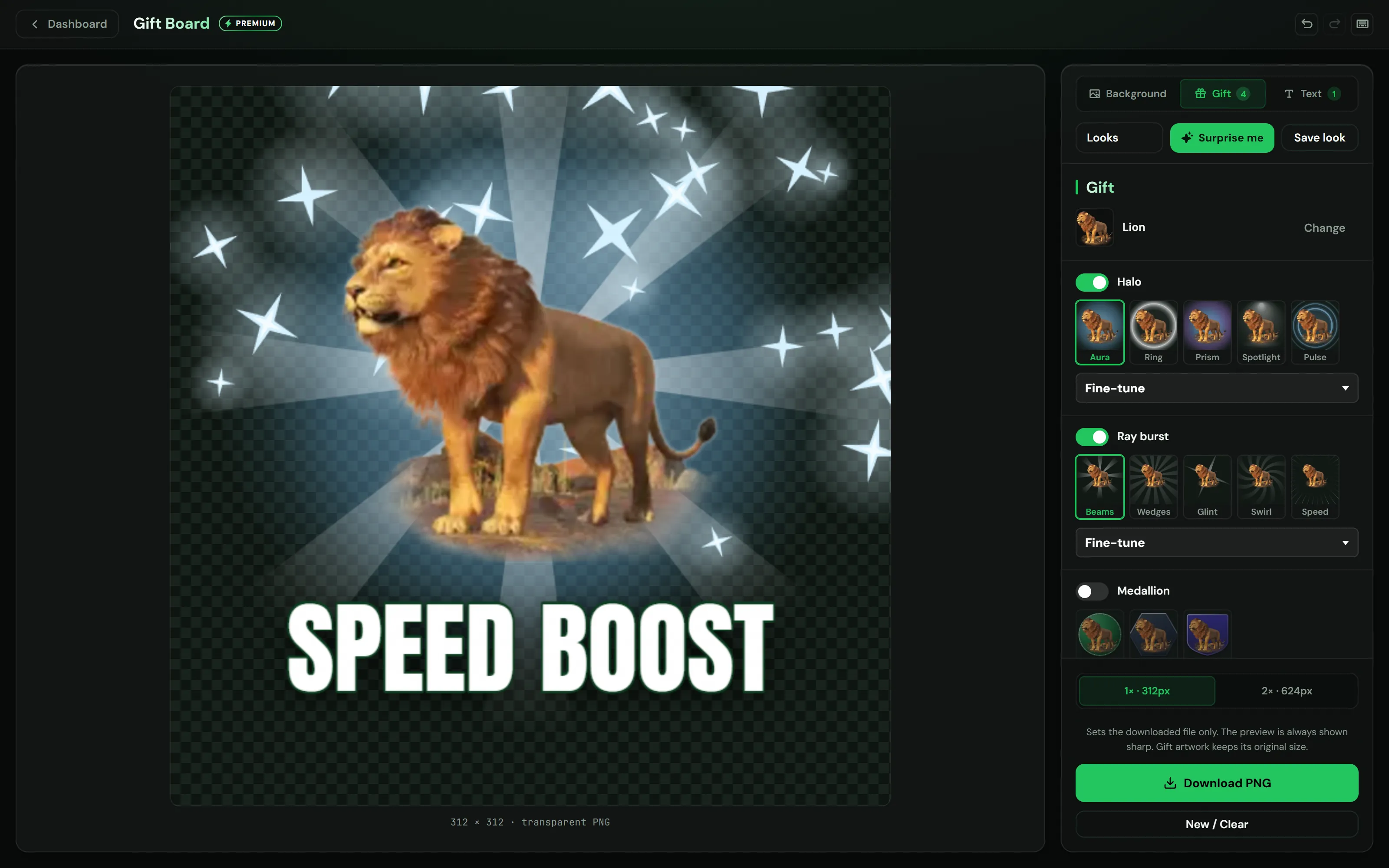
Each chip is a small render of that variant, drawn by the same engine as the download. Surprise me puts one random combination on the card and leaves your gift, your words and your font alone; it always includes a Background fill, so switch that off for a see-through card. Save look keeps up to 8 Looks: a Look remembers your effects and text style, not the gift or the words.
Drag the gift or the text to move it, or use the arrow keys (Shift for bigger steps). Its grips resize and turn it, and holding Shift while turning snaps the angle. Long text shrinks to fit the card, and Undo (Ctrl+Z) takes back a change.
04The PNG
How do I show the gift card on my LIVE?
Download your TikStage Gift Board card as a PNG and add the file to your streaming software as an image. The Gift Board makes a picture file, not an overlay link, so the card on stream is exactly the one you exported.
| 1× · 312px | A 312 × 312 pixel PNG. |
|---|---|
| 2× · 624px | A 624 × 624 pixel PNG. The text and effects get sharper; the gift picture does not, because it keeps the resolution of its original artwork. |
| Background | Transparent unless you switch on Background fill, so only the gift, the words and the effects you switch on sit over your stream. |
| File name | The gift's name and your text, such as rose-speed-boost.png for a Rose that says "Speed boost", with -2x for the larger size. |
A card holds one gift. For a legend of several gifts, make one card per gift and place them side by side, or use the Gift Ticker for an animated band of your gifts.
The card you are working on (gift, text and style) and your Looks are saved on that computer and are there the next time you open the Gift Board. New / Clear empties the gift and the text but keeps the style.
05Limits
What are the limits?
The TikStage Gift Board makes still pictures of one gift each, it runs only in the Windows desktop app, and the download is part of Premium.
- One gift per card, and the card is a still image. The animated band of gifts is the Gift Ticker, a Premium feature.
- Windows desktop app only, not in a web browser.
- The gift picture keeps the resolution of its original artwork, so the 2× file sharpens the text and effects, not the gift.
- The Gift Board keeps one card at a time, plus your Looks, on that computer only. They do not follow you to another PC.
- On the Free plan the preview carries a watermark and there is no download.
06Is it free?
Is the Gift Board free?
The editor is: every plan, including the Free plan with no expiry date, can open the Gift Board and design cards. Downloading the PNG is part of Premium.
Free plan
Editor and preview
Every effect, Looks and Surprise me, with a watermark on the preview. The Download PNG · Premium button takes you to Billing.
Premium
PNG export
Download the card at 1× or 2×, with no watermark.
07FAQ
More questions creators ask
Can I put several gifts on one card?
No. A card holds one gift, so for several gifts you make one card per gift.
Is the gift card animated?
No, it is a still PNG. For an animated band of your gifts, TikStage has the Gift Ticker, part of Premium.
Is the watermark in the downloaded file?
No. The watermark is only on the Free plan's preview, which has no download, and it is never drawn into the exported picture.
Do I need to be live to make a card?
No. The Gift Board draws everything on your computer, so you can prepare cards any time in the TikStage desktop app.
What size is the PNG?
312 × 312 pixels at 1× or 624 × 624 at 2×, with a transparent background unless you add one.