
01What it does
What does TikStage OBS Control do?
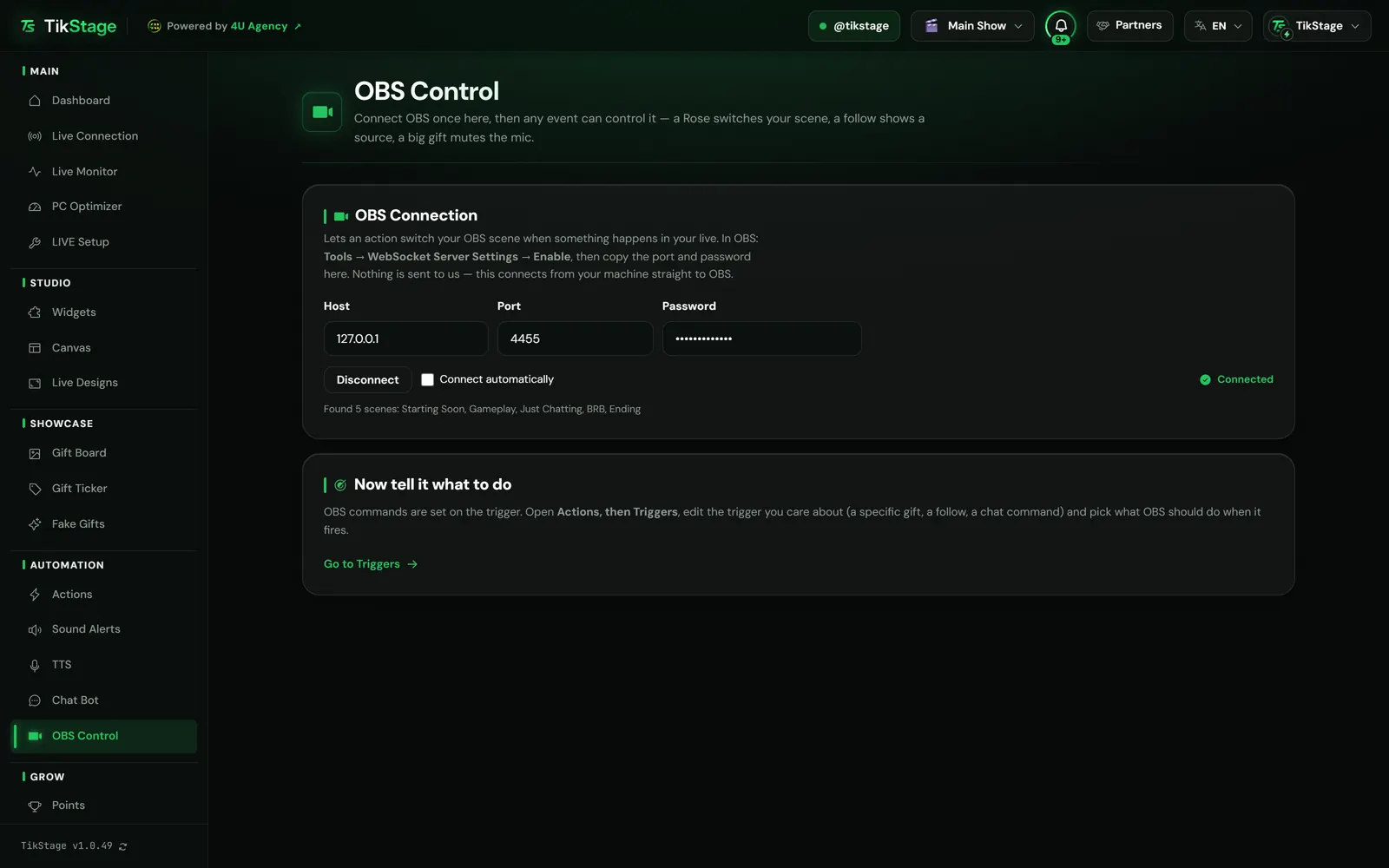
TikStage OBS Control connects the TikStage desktop app to OBS Studio, so events on your TikTok LIVE can control OBS: a Rose switches your scene, a follow shows a source, a big gift mutes the mic. You set up the connection on the OBS Control page, then add an OBS command to any trigger in Actions.
At a glance
| Plan | Free and Premium. A trigger that only controls OBS needs no action, so it uses none of the Free plan's 5 active actions. |
|---|---|
| Where it runs | The TikStage desktop app for Windows. Not in a browser, no Mac build. |
| Works with | OBS Studio, through its WebSocket server. By default it connects to OBS on the same PC: 127.0.0.1, port 4455. |
| What it can do | Switch scene, show or hide a source, mute or unmute audio, start or stop recording, start or stop streaming. |
| Where you set it | On each trigger, with Also control OBS. One OBS command per trigger. |
| Your password | Saved on your PC only, with the host and port, and never sent to TikStage. |
02How to set it up
How do I connect TikStage to OBS with WebSocket?
Turn on the WebSocket server in OBS Studio, enter its port and password on TikStage's OBS Control page and press Connect. Then switch on Also control OBS on the triggers that should drive OBS.
Get the desktop app
OBS Control is a page of the TikStage app for Windows, under Automation in the sidebar.
Download TikStage for WindowsTurn on OBS's WebSocket server
In OBS Studio, open Tools → WebSocket Server Settings and enable it. Note the port and the password.
Connect on the OBS Control page
Leave Host at
127.0.0.1(OBS on this PC), enter the Port and Password, press Connect and tick Connect automatically. The card then reads Connected and lists the scenes it found.Add a command to a trigger
On Actions, open the Triggers tab, edit a trigger, switch on Also control OBS and pick What OBS should do.
Test it
Send a fake gift or follow from the Simulator tab and watch OBS react, without going live.
03OBS commands
What can a TikTok gift do in OBS?
Five things: switch the scene, show or hide a source, mute or unmute an audio source, and start or stop recording or streaming. Each trigger carries one OBS command, on top of its actions or on its own.
| Command | What you pick |
|---|---|
| Switch scene | A scene, then Go back to the previous scene after 1 to 300 seconds (5 to start), or Stay on this scene. |
| Show / hide a source | A scene, a source in that scene, then Show it or Hide it. |
| Mute / unmute audio | An audio source, such as your mic, then Mute it or Unmute it. |
| Start / stop recording | Start or Stop. |
| Start / stop streaming | Start or Stop. |
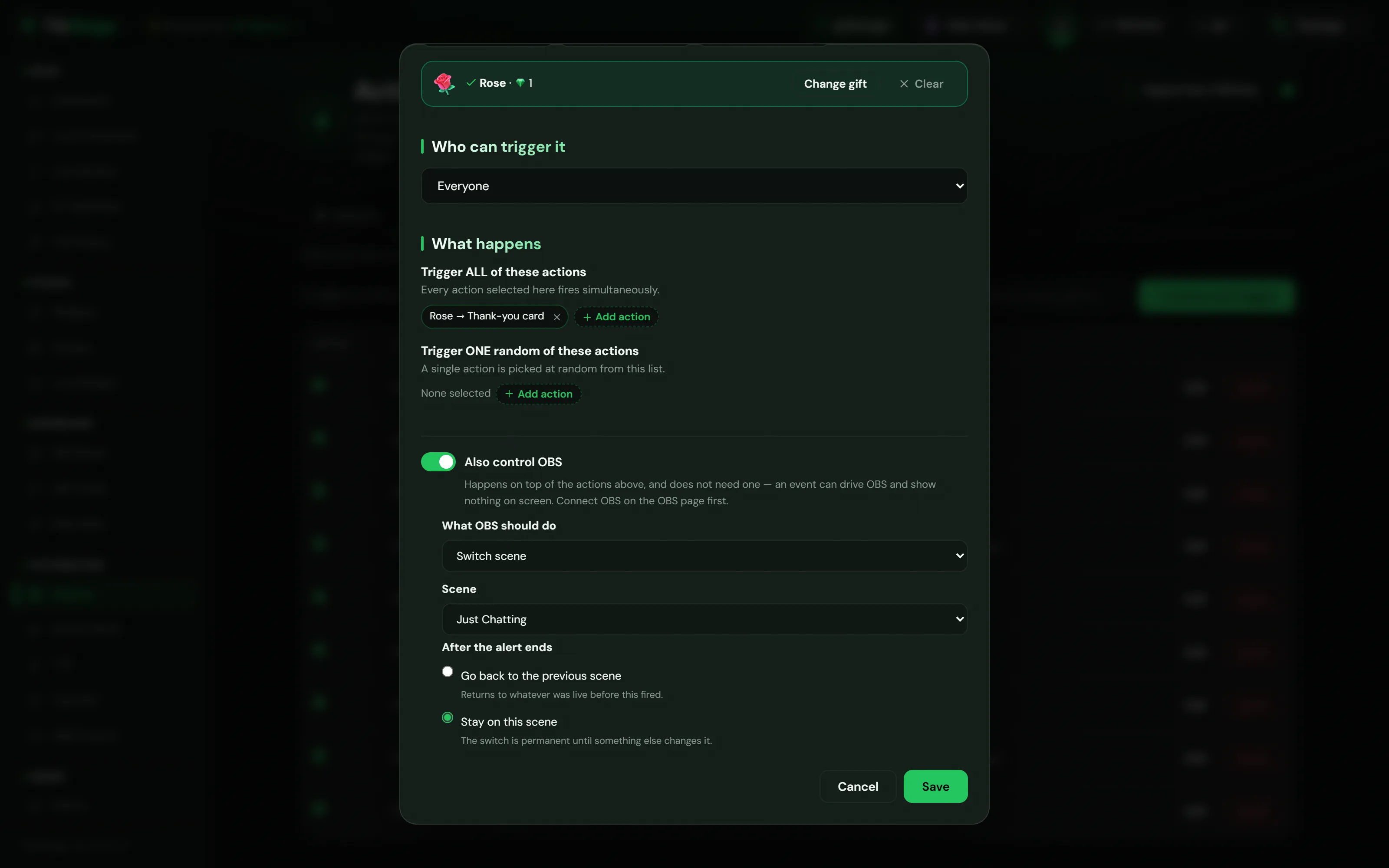
With Go back to the previous scene, TikStage returns to the scene that was live before the switch. If another switch like it comes in the meantime, TikStage waits for the last one and still goes back to that first scene.
Start and stop are separate choices, not a toggle, so two gifts in a burst cannot cancel each other out. A trigger with an OBS command and no action shows Controls OBS only in the Triggers table. More about triggers in the Alerts and Actions guide.
04Troubleshooting
Why won't TikStage connect to OBS?
When TikStage cannot connect to OBS, check that OBS is running, that its WebSocket server is enabled, and that the port and password on the OBS Control page match OBS. The OBS Control card shows its state, and the trigger editor warns you while OBS is not connected.
| You see | What to do |
|---|---|
| Could not connect | The card adds the reason and asks you to check that OBS is running and its WebSocket server is enabled. Then compare the port and password with OBS. |
| Not connected | Press Connect. With Connect automatically ticked, the app connects when it starts and keeps trying while OBS is closed. |
| You need to connect to OBS. in a trigger | Until you connect, names are typed by hand and a typo is a command that never runs. Connect first to pick from lists. |
| A name with (not in OBS right now) | That scene, source or audio source was renamed or removed in OBS. Pick the right one from the list again. |
| Fill in the OBS command when saving | The command is missing its scene, source or audio source. |
05Limits
What are the limits?
TikStage OBS Control works only with OBS Studio, only from the Windows desktop app, and only while that app is open and connected to OBS.
- Windows desktop app only. A command that comes while the app is not connected to OBS is skipped, not sent later.
- OBS Studio only, through its WebSocket server. TikStage cannot switch scenes in TikTok LIVE Studio.
- One OBS command per trigger.
- Rename a scene or source in OBS and its command stops working, with no pop-up, until you pick the new name in the trigger.
- The connection settings are saved on that PC only. On another computer, connect again; your triggers come with your account.
06Is it free?
Is TikStage OBS Control free?
Yes. OBS Control is on the Free plan with no expiry date and on Premium, with the same five commands. A trigger that only controls OBS needs no action, so it does not count toward the Free plan's 5 active actions.
Free plan
OBS Control included
All five commands, on any trigger. Up to 5 actions switched on at once.
Premium
OBS Control included
The same OBS Control. Premium removes the limit on switched-on actions.
07FAQ
More questions creators ask
Does it work with TikTok LIVE Studio?
No. OBS Control works with OBS Studio only, through its WebSocket server.
Do I have to be live for OBS to react?
For real gifts and follows, yes: TikStage must be connected to your LIVE. To test without going live, send a fake event from the Simulator tab on the Actions page.
Does TikStage get my OBS password?
No. Host, port and password are saved on your PC only, and the app connects from your PC straight to OBS.
Can a gift switch the scene without showing an alert?
Yes. A trigger can carry an OBS command and no action at all; the Triggers table then marks it Controls OBS only.
What happens if OBS is closed when a gift arrives?
The command is skipped. With Connect automatically ticked, TikStage reconnects once OBS is open again, and the next gift works.