01What it does
What does TikStage's Spotify song request feature do?
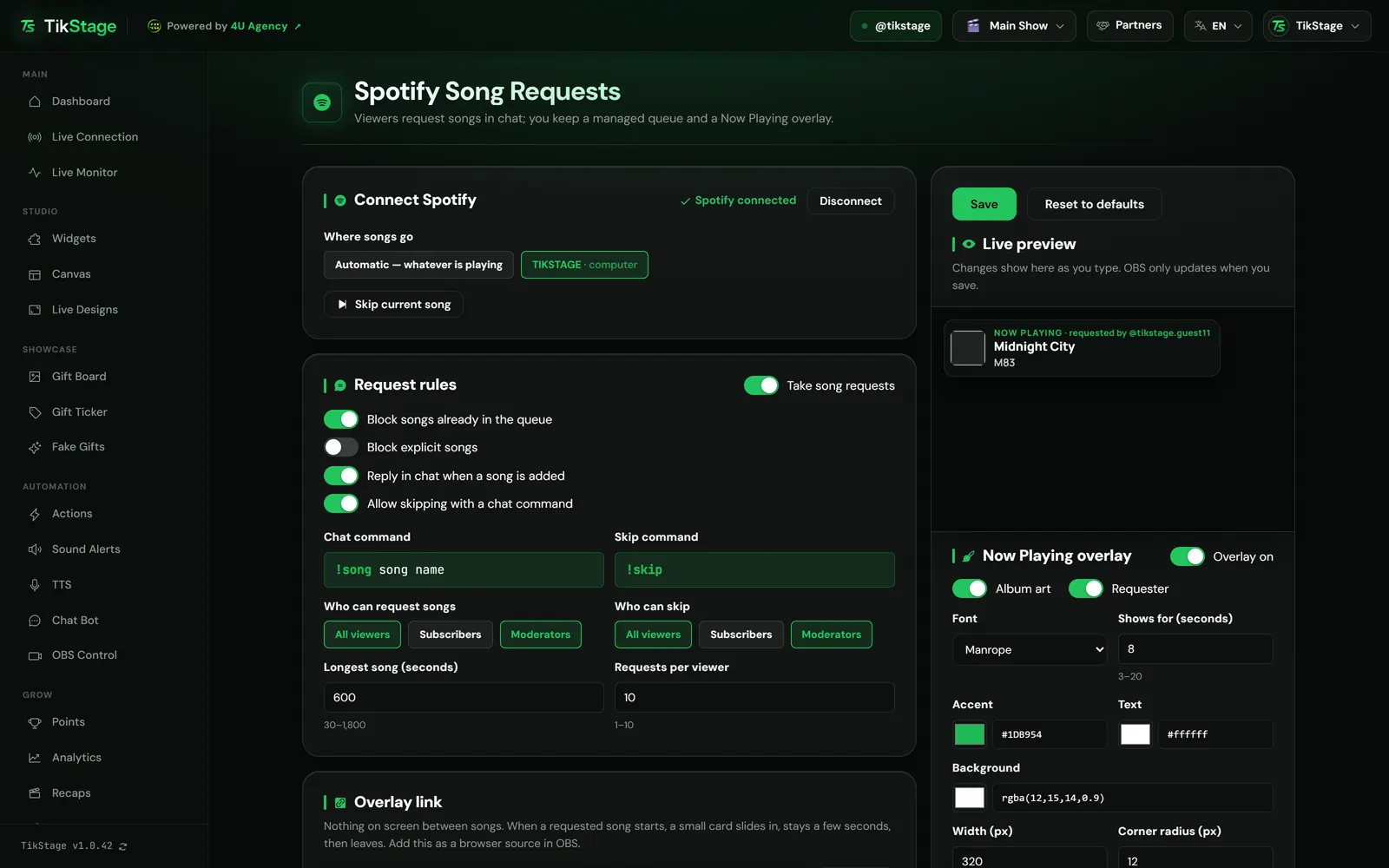
Viewers type !song and a song name in your TikTok LIVE chat, and TikStage adds that song to the queue of your own Spotify app, following your rules. A Now Playing overlay for OBS shows each new song, and for a requested song the name of the viewer who asked.
!song plus a song name. Your rules decide who can ask and what gets in.How requests workReplies in chatTikStage tells the viewer in chat whether the song was added, or why not.See the repliesNow Playing overlayA small card on stream when a new song starts, then nothing until the next one.See the overlay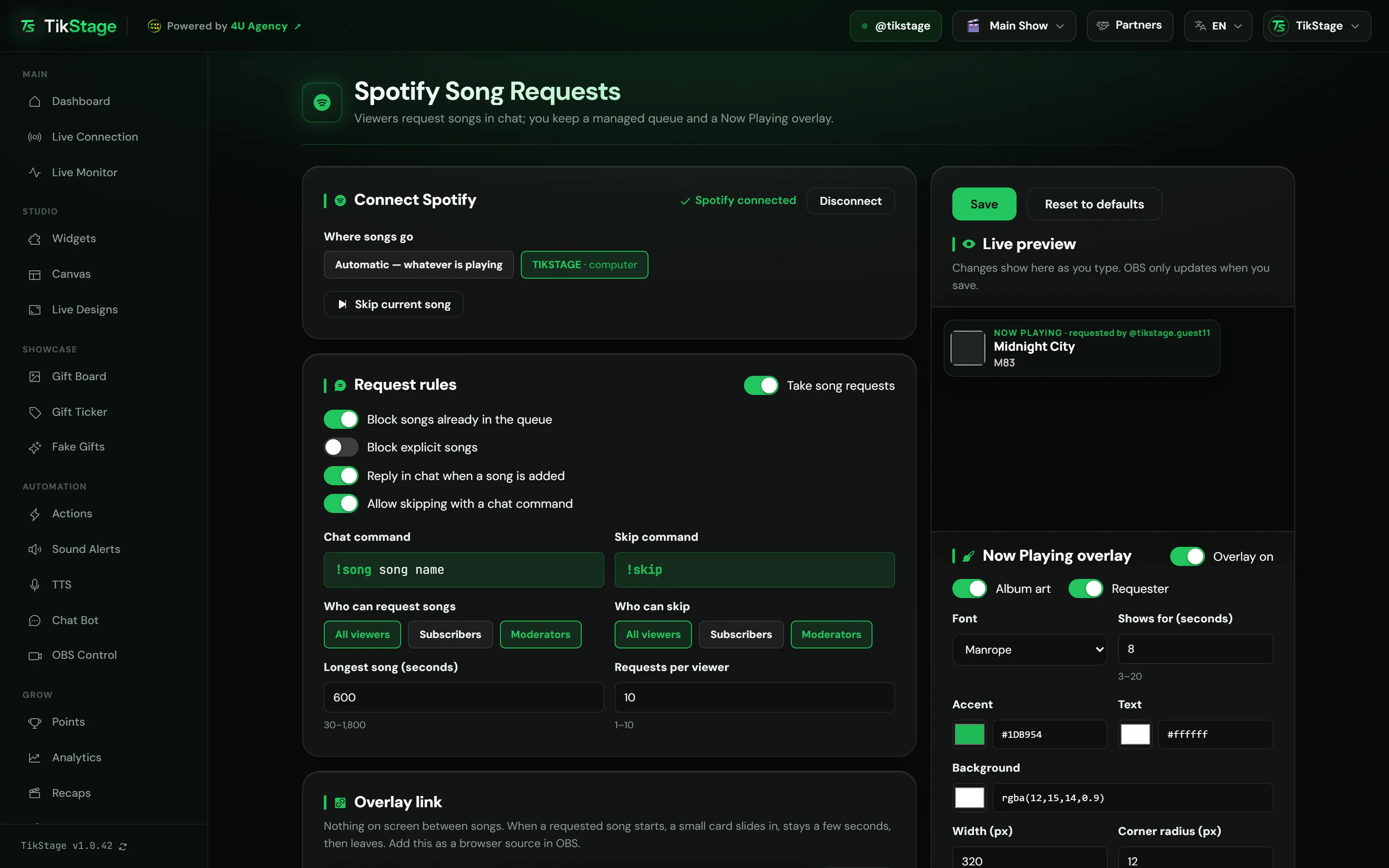
At a glance
| Plan | Premium. The Free plan does not include Spotify song requests. |
|---|---|
| Where it runs | The TikStage desktop app for Windows, open during your LIVE. Not in a web browser. |
| Spotify | A Spotify Premium account, and the Spotify desktop app open and playing on your computer. |
| Chat commands | !song plus a song name to request, !skip to skip. The same for every creator. |
| Overlay | Now Playing: one link for OBS, set up on the same page. |
| Chat replies | Optional, posted by the Chat Bot from your own TikTok account. |
02How to set it up
How do I set up Spotify song requests on my TikTok LIVE?
Install the TikStage desktop app for Windows, sign in to Spotify once, set your rules and add the Now Playing link to OBS. Then play something in Spotify and connect TikStage to your LIVE.
Get the desktop app
Song requests run through your own Spotify on your computer, so the Spotify page works in the TikStage desktop app for Windows. It is under Audience in the sidebar.
Download TikStage for WindowsConnect Spotify
Press Connect Spotify and sign in to your Spotify account in the window that opens. If one sign-in method does not go through, use the email code option. You do this once; the app remembers it on that computer.
Open Spotify and play a song
Start the Spotify desktop app and play something. Under Where songs go, keep Automatic or pick your computer.
Set the rules and the overlay
Check the Request rules, then copy the Overlay link and add it in OBS as a browser source. The overlays guide shows how.
Go live and connect
Connect TikStage to your TikTok LIVE. From then on,
!songin your chat queues songs.
03Song requests
How do viewers request songs on TikTok LIVE?
Viewers type !song and the song name in your LIVE chat. TikStage searches Spotify, takes the first song it finds, checks your request rules and adds it to the end of your Spotify queue, first come, first served.
| Rule | To start with | What it does |
|---|---|---|
| Take song requests | On | The main switch. Off, both !song and !skip are ignored. |
| Who can request songs | All three groups | Any mix of All viewers, Subscribers and Moderators. Subscribers means paid subscribers, not fan club members. |
| Longest song (seconds) | 600 | Longer songs are refused. From 30 to 1,800 seconds. |
| Requests per viewer | 2 | How many of one viewer's songs can wait in the queue at once, from 1 to 10. |
| Block songs already in the queue | On | A song viewers already requested, still waiting or playing, is refused. |
| Block explicit songs | Off | Songs Spotify marks as explicit are refused. |
Skipping. With Allow skipping with a chat command on, !skip skips the song playing now. Only Moderators can use it to start with; you can open it to more groups under Who can skip. You can also press Skip current song on the page yourself.
04Replies in chat
Does TikStage reply in chat when someone requests a song?
Yes, if you want. With Reply in chat when a song is added switched on, as it is to start with, TikStage answers the viewer in your LIVE chat: the song and its place in the queue, or why it was not added.
| When | Reply in chat |
|---|---|
| The song was added | @TikStage Fan added "Song" by Artist (#2 in queue) |
| Nothing was found | @TikStage Fan couldn't find "song name" |
| The song is too long | @TikStage Fan that song is too long (max 10 min) |
| The viewer has enough songs waiting | @TikStage Fan you already have 2 song(s) in the queue |
| The viewer is not in an allowed group | @TikStage Fan song requests are limited right now |
!skip worked | ⏭️ skipped by @TikStage Fan |
The replies are posted by the Chat Bot from your own TikTok account, so they need its one-time setup in the desktop app: signed in to TikTok there and confirmed once. Without it, songs are still added, just without a reply. A refused !skip gets no reply at all.
05Now Playing overlay
How do I show the current Spotify song on my TikTok LIVE?
With TikStage's Now Playing overlay, one link you add to OBS. Nothing is on screen between songs; when a new song starts in your Spotify, a small card slides in with the title, the artist and the album art, stays a few seconds, then leaves.
A requested song also shows requested by @name next to Now playing, so the viewer who asked sees their name on stream. Songs you start yourself get the card too, without a name.
You choose whether the album art and the requester appear, the font, how long the card stays (Shows for (seconds), 3 to 20, 8 to start with), the accent, text and background colours (the background can be see-through), the width (200 to 640 px) and the corner radius. There is one design, no progress bar and no list of upcoming songs. There is no position setting: you place the card by placing the browser source in OBS.
06Limits
What are the limits?
TikStage's Spotify song requests are part of Premium, run from the Windows desktop app, and need Spotify Premium with the Spotify desktop app playing on your computer.
- TikStage desktop app for Windows only, open during your LIVE. Not in a browser, no Mac build.
- Your Spotify account must be Spotify Premium, with the Spotify desktop app open and playing. Phones and speakers are not offered as targets.
- The commands are fixed (
!songand!skip), and the chat replies are fixed English text. - First come, first served: no gift priority, and TikStage cannot reorder or remove a song once it is in your Spotify queue. Skip it when it plays.
- Music rights are yours: TikStage only controls your own Spotify account and grants no music licence.
07Is it free?
Are Spotify song requests free on TikStage?
No. Spotify song requests and the Now Playing overlay are part of Premium. TikStage has a Free plan with no expiry date, but this feature is not in it.
Free plan
No Spotify
The Spotify page shows a Premium feature card with a way to upgrade.
Premium
Requests and overlay
Song requests from chat, the skip command and the Now Playing overlay. Spotify Premium is a separate plan, from Spotify.
08FAQ
More questions creators ask
Do I need Spotify Premium?
Yes. Adding songs to your queue needs Spotify Premium on your Spotify account, as well as TikStage Premium.
Can I change the !song command?
No. The commands !song and !skip are the same for every creator.
Do I need a Spotify developer account or API keys?
No. You sign in to Spotify once inside the TikStage desktop app, and it remembers you on that computer.
Can the songs play on my phone?
No. Songs go to the Spotify desktop app on a computer, not to phones or speakers.
Can I skip a song myself?
Yes. Press Skip current song on the Spotify page; no chat command needed.
Does the overlay show songs nobody requested?
Yes. Every new song gets the card; a requested one also shows who asked for it.